Wifi Vs Bluetooth Smart Locks
Smart locks have revolutionized home security, offering convenience and advanced features that traditional locks lack. Among the most popular options are Wi-Fi and Bluetooth smart locks, each with unique characteristics that cater to different user needs. Understanding their differences can help you choose the right one for your home.
Wi-Fi smart locks, such as the Philips Wi-Fi Door Lock, allow for remote access from anywhere, making them ideal for homeowners who travel frequently or want to manage their door security from afar. In contrast, Bluetooth smart locks typically require proximity for access, making them more suitable for everyday use when you’re at home.
Disclosure: As an Amazon Associate I earn from qualifying purchases at no cost for you.

- 𝐅𝐥𝐞𝐱𝐢𝐛𝐥𝐞 𝐖𝐚𝐲𝐬 𝐭𝐨 𝐔𝐧𝐥𝐨𝐜𝐤: Unlock the way you want: app, passcode, fingerprint, physical k…
- 𝐔𝐧𝐥𝐨𝐜𝐤 𝐅𝐫𝐨𝐦 𝐀𝐧𝐲𝐰𝐡𝐞𝐫𝐞: Built-in Wi-Fi lets you lock and unlock your door remotely anytime…
- 𝗩𝗼𝗶𝗰𝗲 𝗖𝗼𝗻𝘁𝗿𝗼𝗹 𝗥𝗲𝗮𝗱𝘆: Pair with Alexa or Google Assistant to unlock or lock with your voi…
Why This Matters
Choosing between Wi-Fi and Bluetooth smart locks can significantly impact your home security and convenience. Wi-Fi locks are often more versatile, offering remote access and integration with smart home systems. Bluetooth locks, while typically easier to install, may have limitations in range and functionality.
Understanding these technologies helps you decide based on your lifestyle, security needs, and how often you may need to grant access to others.
Key Benefits
**Wi-Fi Smart Locks:**
– **Remote Access:** Control your lock from anywhere using a smartphone app, like the Philips Wi-Fi Door Lock.
– **Integration with Smart Home Systems:** Many Wi-Fi locks work seamlessly with voice assistants like Alexa and Google Assistant.
– **Real-Time Notifications:** Receive alerts on your phone whenever the lock is used, enhancing security.
**Bluetooth Smart Locks:**
– **Ease of Use:** Unlocking is often as simple as being within range with your smartphone.
– **Installation:** Typically easier to install, requiring no additional hubs or extensive wiring.
– **Cost-Effective:** Often more affordable than their Wi-Fi counterparts, making them a popular choice for budget-conscious consumers.
Common Drawbacks & Limitations
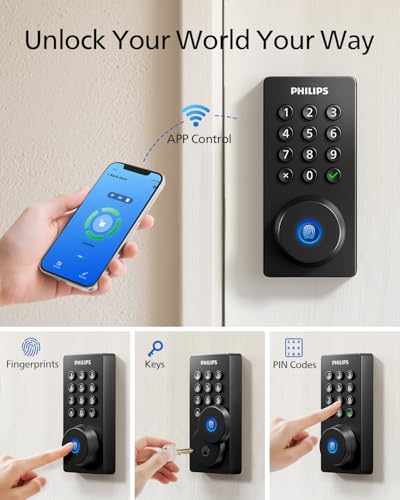
- 𝐅𝐥𝐞𝐱𝐢𝐛𝐥𝐞 𝐖𝐚𝐲𝐬 𝐭𝐨 𝐔𝐧𝐥𝐨𝐜𝐤: Unlock the way you want: app, passcode, fingerprint, physical k…
- 𝐔𝐧𝐥𝐨𝐜𝐤 𝐅𝐫𝐨𝐦 𝐀𝐧𝐲𝐰𝐡𝐞𝐫𝐞: Built-in Wi-Fi lets you lock and unlock your door remotely anytime…
- 𝗩𝗼𝗶𝗰𝗲 𝗖𝗼𝗻𝘁𝗿𝗼𝗹 𝗥𝗲𝗮𝗱𝘆: Pair with Alexa or Google Assistant to unlock or lock with your voi…
**Wi-Fi Smart Locks:**
– **Reliability on Internet Connection:** If your Wi-Fi goes down, so does your access to the lock.
– **Power Consumption:** Wi-Fi locks generally consume more battery power than Bluetooth locks, requiring more frequent battery changes.
– **Complex Setup:** Some users may find the initial setup process complicated, especially if integrating with other smart devices.
**Bluetooth Smart Locks:**
– **Limited Range:** Bluetooth locks only work when you’re close to the door, which may not be convenient for everyone.
– **No Remote Access:** If you’re away from home, you can’t control the lock unless you’re within Bluetooth range.
– **Potential for Connectivity Issues:** Bluetooth connections can sometimes be unstable, leading to access issues.
What to Look For (Buyer’s Checklist)
– **Connectivity Type:** Determine if you prefer Wi-Fi for remote access or Bluetooth for local use.
– **Integration with Smart Home Devices:** Check compatibility with your existing smart home ecosystem.
– **User Management:** Look for features that allow you to create temporary access codes or manage multiple users.
– **Battery Life:** Consider locks with longer battery life or low-battery alerts.
– **Security Features:** Look for features like auto-lock, tamper alerts, and encryption for added security.
How to Choose for Your Situation
When selecting a smart lock, consider your lifestyle and security needs. If you frequently travel or have guests who need access while you’re away, a Wi-Fi smart lock may be more suitable. For those who primarily need a smart lock for convenience while at home, a Bluetooth smart lock could suffice.
Also, assess the layout of your home and where the lock will be installed. If Wi-Fi coverage is poor in that area, a Bluetooth lock may be the better option.
Care, Safety, and Longevity Tips
To ensure the longevity of your smart lock:
– **Regularly Update Software:** Keep the lock’s firmware updated to protect against vulnerabilities.
– **Check Battery Levels:** Monitor battery life and replace batteries promptly to avoid lockouts.
– **Clean the Lock:** Periodically clean the exterior and keypad to prevent dirt buildup.
– **Test Functionality:** Regularly test the lock’s features, including remote access and user management.
Recommended Picks
When considering smart locks, the Philips Wi-Fi Door Lock stands out for its versatile unlocking options, including fingerprint recognition and voice control. For those seeking a Bluetooth option, the ULTRALOQ U-Bolt Pro offers robust features like auto-unlock and a keypad, making it ideal for families. Another solid choice is the August Wi-Fi Smart Lock, which enhances existing deadbolts for a seamless upgrade.
Each of these locks provides unique features, catering to different preferences and security needs.
FAQ
**1. Can I use a smart lock without a smartphone?**
Yes, many smart locks come with physical keys or keypads for traditional access.
**2. How secure are smart locks?**
Smart locks typically use encryption and other security features to protect against unauthorized access.
**3. Will a smart lock work during a power outage?**
Wi-Fi smart locks may not function if the internet is down, but most have backup options like physical keys.
**4. Can I access my smart lock from anywhere?**
Wi-Fi smart locks allow remote access from anywhere, while Bluetooth locks require proximity.
**5. How easy is it to install a smart lock?**
Most smart locks are designed for easy installation, often requiring just a screwdriver and about 10 minutes of your time.
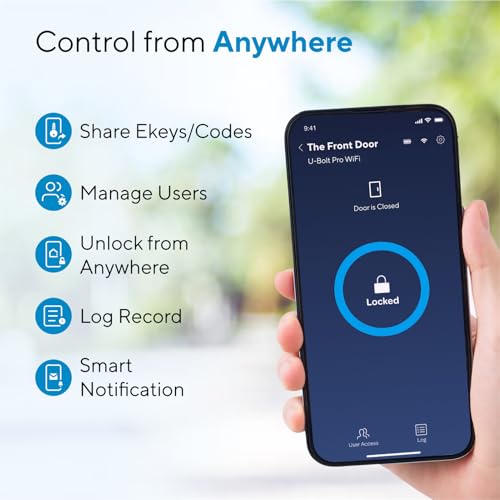
- Control Your Ultraloq Smart Lock Anytime, Anywhere: Lock, unlock, share access and see a…
- 8-in-1 Keyless Entry Door Lock: AI-powered Fingerprint ID + Keypad + App Remote Control …
- Enhanced Security and Intelligence:The Smart Door Lock auto-locks when the door closes a…
Conclusion
Choosing the right smart lock for your home involves understanding the differences between Wi-Fi and Bluetooth options. Wi-Fi smart locks offer greater flexibility and remote access, while Bluetooth locks provide ease of use and installation. By assessing your lifestyle, security needs, and preferences, you can select a smart lock that enhances your home security and convenience.
Popular Picks to Compare
- 𝐅𝐥𝐞𝐱𝐢𝐛𝐥𝐞 𝐖𝐚𝐲𝐬 𝐭𝐨 𝐔𝐧𝐥𝐨𝐜𝐤: Unlock the way you want: app, passcode, fingerprint, physical k…
- 𝐔𝐧𝐥𝐨𝐜𝐤 𝐅𝐫𝐨𝐦 𝐀𝐧𝐲𝐰𝐡𝐞𝐫𝐞: Built-in Wi-Fi lets you lock and unlock your door remotely anytime…
- 𝗩𝗼𝗶𝗰𝗲 𝗖𝗼𝗻𝘁𝗿𝗼𝗹 𝗥𝗲𝗮𝗱𝘆: Pair with Alexa or Google Assistant to unlock or lock with your voi…

- Control Your Ultraloq Smart Lock Anytime, Anywhere: Lock, unlock, share access and see a…
- 8-in-1 Keyless Entry Door Lock: AI-powered Fingerprint ID + Keypad + App Remote Control …
- Enhanced Security and Intelligence:The Smart Door Lock auto-locks when the door closes a…
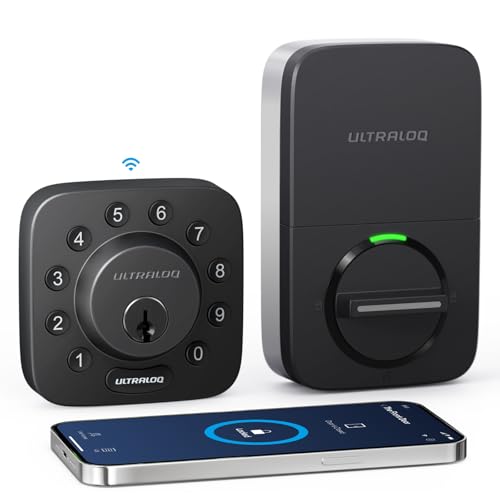
- Control Your Smart Lock from Anywhere: Lock, unlock, share access, notify door status an…
- 7-in-1 Keyless Entry Door Lock: Keypad + App Remote Control + Auto Unlock / Auto Lock + …
- Enhanced Security and Intelligence:The U-Bolt smart door lock auto-locks when the door c…

- Built-in WiFi, No Hub Needed: Connects directly to 2.4GHz Wi-Fi—no additional gateway pu…
- App Remote Management: Use the App to unlock or lock remotely, monitor lock status in re…
- 7 IN 1Unlock & Lock: Control access via KK Home remote App, fingerprints, PIN codes, voi…

- UPGRADE YOUR EXISTING DEADBOLT: August smart locks fit on the inside of your door, makin…
- GRANT ACCESS WITH THE AUGUST APP: Forget key copying. Quickly and easily share permanent…
- EASY TO INSTALL ON ANY DOOR: Even if you’re not so handy, installation only takes about …

