Smart Strips For Entertainment Center Setup
Setting up smart strips for your entertainment center can dramatically enhance your viewing experience. By integrating LED strip lights, you can create a dynamic and immersive atmosphere that complements your favorite movies and games. In this guide, we’ll walk you through the process of installing smart strips, highlight essential tools, and provide tips to ensure you achieve the best results. Always ensure that your workspace is safe; avoid working near water sources and ensure that all devices are unplugged during installation.
Disclosure: As an Amazon Associate I earn from qualifying purchases at no cost for you.
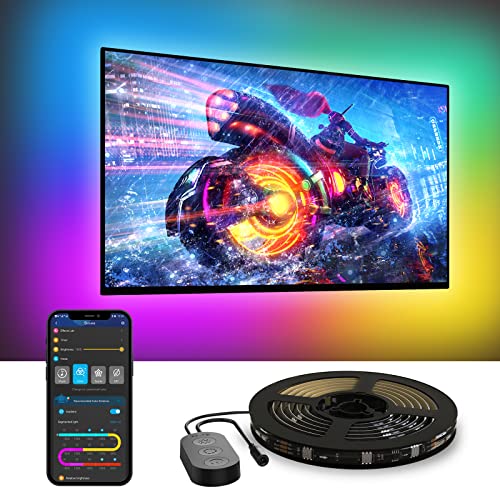
- A Symphony of RGBIC Lighting: Govee RGBIC technology realizes the color segmentation dis…
- App & Voice Control: Manage the LED TV lights via app or smart voice control with Alexa …
- Multiple Preset Scenes: Govee Home App offers 99+ preset scene modes and 11 music modes,…
What You’ll Need
- Smart LED strip lights (e.g., Govee TV LED Backlight)
- Scissors (if cutting the strip is necessary)
- Cable clips or adhesive tape (for securing the strips)
- Smartphone with the corresponding app installed
- Access to Wi-Fi for smart features
- Measuring tape (to ensure proper fit)
- Power source (for USB-powered strips)
Step-by-Step
- Measure Your TV: Use a measuring tape to determine the sides of your TV where you will attach the LED strips. This ensures the strips fit perfectly around your screen.
- Prepare the Area: Clean the back of your TV where you plan to attach the strips. Removing dust and grease will help the adhesive stick better.
- Cut the Strip (if necessary): If your LED strip is too long, use scissors to cut it at designated points. Ensure you follow the manufacturer’s guidelines for cutting.
- Attach the Strips: Start peeling off the adhesive backing and carefully stick the LED strip along the edges of your TV. Use cable clips for extra security if needed.
- Connect to Power: Plug the LED strip into a power source. Ensure the cord is neatly managed to avoid clutter.
- Download the App: Install the smart strip’s app on your smartphone. For Govee products, download the Govee Home App.
- Pair the Device: Follow the app instructions to connect your LED strip to your Wi-Fi network and sync with your smartphone.
- Customize Your Settings: Explore various lighting modes, colors, and scenes available in the app to create the perfect ambiance for your entertainment center.
Pro Tips for Better Results

- A Symphony of RGBIC Lighting: Govee RGBIC technology realizes the color segmentation dis…
- App & Voice Control: Manage the LED TV lights via app or smart voice control with Alexa …
- Multiple Preset Scenes: Govee Home App offers 99+ preset scene modes and 11 music modes,…
- Consider placing the LED strips on the back of your TV for a halo effect, which can enhance the viewing experience.
- Experiment with different colors and modes during movie nights to see what enhances the atmosphere best.
- Use music sync features to make your lights react to the audio, creating an engaging experience during parties or gaming sessions.
- Group multiple smart strips together for larger setups to achieve a cohesive lighting effect across your entertainment area.
Common Mistakes
- Not cleaning the surface before installation can lead to poor adhesion.
- Cutting the strip incorrectly may render it unusable, so always check the cutting points.
- Overstretching the LED strip can damage the wiring; handle gently.
- Ignoring app updates may limit functionality and access to new features.
Troubleshooting
- If the lights do not turn on, check the power connection and ensure the strip is plugged in securely.
- For connectivity issues, ensure your Wi-Fi network is functioning and within range.
- If the app is not syncing with the lights, try restarting both the app and the LED strip.
- For color issues, check the app settings to ensure the correct color modes are selected.
Maintenance / Next-Time Checklist
- Regularly check the adhesive to ensure the strips remain securely attached.
- Dust the strips periodically to maintain brightness and color accuracy.
- Update the app regularly to access new features and enhancements.
- Test the smart features occasionally to ensure they are functioning correctly.
Recommended Products & Tools
For a successful smart strip installation, consider the following products:
- Govee TV LED Backlight: This product offers vibrant RGBIC lighting effects, allowing for dynamic color displays that enhance your viewing experience.
- Cable Clips: These help secure the LED strips neatly, preventing them from peeling off or sagging over time.
- Smartphone with App Control: Essential for managing your lighting remotely and accessing various features effortlessly.
- Measuring Tape: Ensures accurate measurements for a perfect fit around your TV.
FAQ
Can I use smart strips on any TV size?
Smart strips are available in various lengths, designed to fit different TV sizes. Make sure to choose a strip that fits your specific TV dimensions.
Do smart strips require a hub or extra equipment?
Most smart LED strips connect directly to your Wi-Fi and can be controlled via an app, eliminating the need for additional hubs.
Can I cut the smart strips to fit my TV?
Yes, you can cut smart strips at designated points to fit your TV, but make sure to follow the manufacturer’s instructions to avoid damage.
Do smart strips work with voice assistants?
Many smart strips are compatible with voice assistants like Alexa and Google Assistant, allowing for hands-free control.
How do I reset my smart strip if it’s not working?
Refer to the manufacturer’s instructions on how to reset the strip, which typically involves holding down a button or unplugging it for a specific duration.

- Unique RGBIC Lighting Effects: Govee TV LED Backlight allows to customize each strip seg…
- Smart App & Voice Control: Manage the LED lights for TV with Govee Home App via Bluetoot…
- 77 Preset Scene Modes: Govee Home App offers 77 preset scene modes and 11 music modes, f…
Wrap-Up
Installing smart strips in your entertainment center can transform your viewing experience, providing customizable lighting that enhances ambiance. By following this guide, you can ensure a successful setup that integrates seamlessly with your lifestyle. Remember to maintain your smart strips regularly and experiment with different settings to find what works best for you. Enjoy your newly enhanced entertainment space!
Recommended Products & Tools
- A Symphony of RGBIC Lighting: Govee RGBIC technology realizes the color segmentation dis…
- App & Voice Control: Manage the LED TV lights via app or smart voice control with Alexa …
- Multiple Preset Scenes: Govee Home App offers 99+ preset scene modes and 11 music modes,…

- Unique RGBIC Lighting Effects: Govee TV LED Backlight allows to customize each strip seg…
- Smart App & Voice Control: Manage the LED lights for TV with Govee Home App via Bluetoot…
- 77 Preset Scene Modes: Govee Home App offers 77 preset scene modes and 11 music modes, f…

- Innovative Immersive Visual: This USB-powered backlight features an innovative built-in …
- Timer Function: This strip light 2 ways to set timers, remote control timer mode (1- 4h)…
- Multiple Scene Modes: This TV LED backlight features an HD camera that synchronizes the …
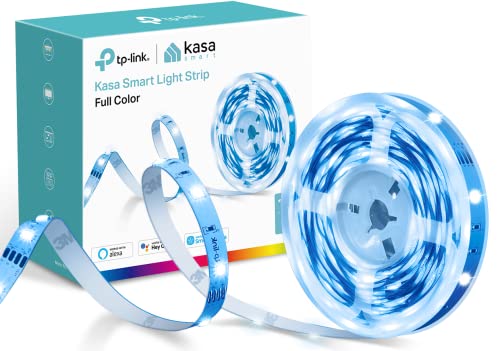
- [High brightness & saturation] The 16.4ft LED light strip features customization up to 1…
- [Animated lighting effects] The Kasa Smart light strip features advanced animated lighti…
- [Complete control] You can control your light strip from anywhere with the Kasa App or w…

- TV Stand with Charging Station: Our charging station has 2AC, 2USB, 1Type-C, it can meet…
- Product Size: TV stand is 47.2inch in length, 11.8inch in width and 21.6inch in height, …
- Abundant Storage Space:It has 2 tiers open mesh shelves and 4 hooks, have enough space t…

- 📺 TV Stand Specifications: Fits TVs from 55 to 80 inches, supporting up to 110 lbs on th…
- ✨ LED Backlighting: Equipped with LED strips offering 20 colors, 21 dynamic modes, and 5…
- 🎮 Modular Design: Features a modern modular setup with two L-shaped shelves and one rect…
