Set Smart Plug Timers And Schedules
Setting timers and schedules on your smart plugs can greatly enhance your home automation experience. By automating your devices, you’ll achieve convenience and energy savings while ensuring that your appliances operate when you need them most. Before getting started, be sure to follow safety guidelines, such as not overloading your smart plugs and ensuring they are used in dry environments.
Disclosure: As an Amazon Associate I earn from qualifying purchases at no cost for you.

- Stability Upgrade Quick Connection:Supports Bluetooth or WiFi connection.The improved Wi…
- Hand-Free Voice Control:Smart plugs that work with Alexa and Googel Assistant. Just give…
- APP Remote Control From Anywhere:You also can control your outlet timers anywhere anytim…
What You’ll Need
- A compatible smart plug, such as the GHome Smart Plug or EIGHTREE Smart Plug.
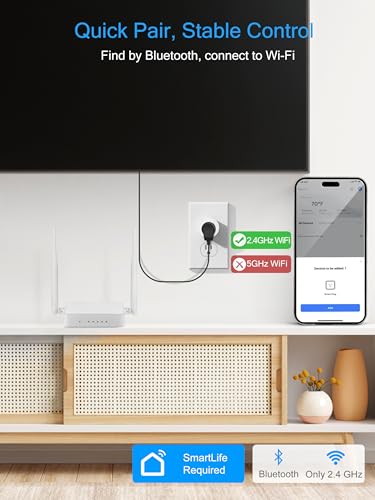
- A stable 2.4GHz Wi-Fi network.
- The respective app for your smart plug (e.g., GHome App, Smart Life App, or Tuya App).
- A smartphone or tablet for app control.
- Access to a voice assistant like Alexa or Google Assistant (optional).
Step-by-Step
- Download and Install the App: Start by downloading the appropriate app for your smart plug from your device’s app store. Follow the installation instructions to set it up.
- Plug in Your Smart Plug: Insert the smart plug into an electrical outlet. Ensure the plug is within range of your Wi-Fi router for a stable connection.
- Connect to Wi-Fi: Open the app and follow the prompts to connect your smart plug to your 2.4GHz Wi-Fi network. Ensure you have the correct network credentials ready.
- Add Your Device: Once connected to Wi-Fi, use the app to add your smart plug. This typically involves selecting the device type and following on-screen instructions.
- Set Up Timers and Schedules: In the app, navigate to the timer or scheduling section. Here, you can set specific times for your smart plug to turn on or off, either circularly or randomly.
- Enable Voice Control (Optional): If you wish to use voice commands, link your smart plug with Alexa or Google Assistant through the app settings. Follow the prompts to complete this integration.
- Test Your Settings: After setting up, test the timers by manually triggering the plug to ensure everything works as expected.
- Monitor and Adjust: Regularly check the app to monitor usage and adjust schedules as needed to optimize your smart home experience.
Pro Tips for Better Results

- Stability Upgrade Quick Connection:Supports Bluetooth or WiFi connection.The improved Wi…
- Hand-Free Voice Control:Smart plugs that work with Alexa and Googel Assistant. Just give…
- APP Remote Control From Anywhere:You also can control your outlet timers anywhere anytim…
- Group multiple smart plugs in the app to control them simultaneously, which is especially useful for lights or holiday decorations.
- Use the random scheduling feature for security purposes, making it appear as if someone is home when you’re away.
- Regularly update your app and firmware for the best performance and new features.
Common Mistakes
- Not checking the compatibility of your smart plug with your home network and app.
- Overloading the smart plug with devices that exceed its rated capacity.
- Forgetting to keep the smart plug connected to a stable 2.4GHz Wi-Fi network, which can cause disconnection issues.
Troubleshooting
- If your smart plug isn’t responding, ensure it is connected to power and that your Wi-Fi network is functioning properly.
- Restart the smart plug and your Wi-Fi router to resolve connectivity issues.
- Check the app for any firmware updates or settings that may need adjustment.
Maintenance / Next-Time Checklist
- Regularly check the app for updates to ensure optimal performance.
- Inspect the smart plug for any signs of wear or damage before each use.
- Review your schedules periodically to ensure they still meet your needs.
Recommended Products & Tools
To enhance your smart home experience, consider using:
- GHome Smart Plug: Known for its stability and easy integration with voice assistants, making it a reliable choice for automation.
- EIGHTREE Smart Plug: Suitable for high-power appliances, ensuring safe operation for devices like heaters and air conditioners.
- Kasa Smart Plug: Offers a compact design and trusted reliability, ideal for everyday use and easy to set up.
FAQ
Can I use multiple smart plugs in one room?
Yes, you can use multiple smart plugs in one room and control them individually or as a group through the app.
Do I need a hub for my smart plug?
No, most modern smart plugs, including the ones mentioned, do not require a hub and connect directly to your Wi-Fi network.
What if my smart plug loses connection?
Try restarting the plug and your Wi-Fi router. Ensure the plug is within range of your Wi-Fi signal.
Can I control my smart plug remotely?
Yes, as long as your smart plug is connected to the internet, you can control it from anywhere using the app.
Is it safe to use smart plugs with high-power devices?
Ensure that the smart plug is rated for the specific device’s power requirements. Plugs like the EIGHTREE 15A Smart Plug are designed for high-power appliances.
- [2025 Upgrade – 𝟏𝟓𝐀 𝐇𝐢𝐠𝐡 𝐏𝐨𝐰𝐞𝐫]: Smart plug ideal for heavy-duty appliances like ACs, he…
- APP Remote Control: Easily control your home appliances at any time and any place throug…
- Voice Control: Smart plugs that work with Google Assitant, you can speak with Alexa and …
Wrap-Up
Setting timers and schedules for your smart plugs can significantly enhance your home automation experience. By following the steps outlined above, you can ensure that your devices work as needed, providing convenience and energy savings. Regular monitoring and adjustments will keep your smart home running smoothly, making your day-to-day life more manageable.
Recommended Products & Tools
- Stability Upgrade Quick Connection:Supports Bluetooth or WiFi connection.The improved Wi…
- Hand-Free Voice Control:Smart plugs that work with Alexa and Googel Assistant. Just give…
- APP Remote Control From Anywhere:You also can control your outlet timers anywhere anytim…

- [2025 Upgrade – 𝟏𝟓𝐀 𝐇𝐢𝐠𝐡 𝐏𝐨𝐰𝐞𝐫]: Smart plug ideal for heavy-duty appliances like ACs, he…
- APP Remote Control: Easily control your home appliances at any time and any place throug…
- Voice Control: Smart plugs that work with Google Assitant, you can speak with Alexa and …

- FAST, STABLE CONNECTION: Simply plug in and keep the smart outlet connected to your stab…
- HAND-FREE VOICE CONTROL: Smart plugs that work with Alexa & Google Home Assistant. Just …
- SCHEDULES & AUTO-OFF TIMER: Easy to set timers and add schedules to connected devices ci…

- Stability Upgrade: Supports Bluetooth or WiFi connection, which is more stable and faste…
- Smart Voice Control: WiFi Plugs Work with Amazon Alexa and Google Assistant, so you can …
- Scheduling & Group Controller: Create customized schedules to power your electronic appl…
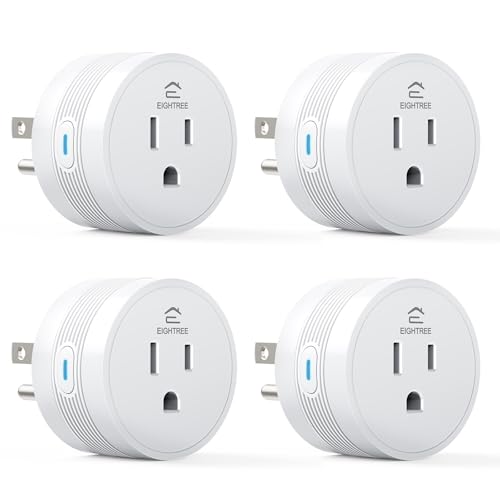
- [15A High-Load Smart Plug for Home Appliances]: Designed for high-power devices such as …
- [Faster & Easier Setup with Bluetooth + Wi-Fi]: Connect instantly via Bluetooth during s…
- [Works with Alexa & Google Home]: Use voice commands to turn devices on or off, or autom…

- Voice control: Kasa smart plugs that work with Alexa and Google Home Assistant. Enjoy th…
- Easy set up and use: 2.4GHz Wi-Fi connection required. Plug in, open the Kase app, follo…
- Scheduling: Use timer or countdown schedules set your smart plug to automatically turn o…
