How To Group Smart Switches For Room Voice Control
Grouping smart switches for room voice control allows you to control multiple lights with a single command, simplifying your smart home experience. In this guide, you will learn how to set up your smart switches to work in unison, enabling convenient voice-activated control through platforms like Alexa and Google Assistant. Before you begin, ensure you turn off power at the circuit breaker to prevent any electrical hazards during installation.
Disclosure: As an Amazon Associate I earn from qualifying purchases at no cost for you.

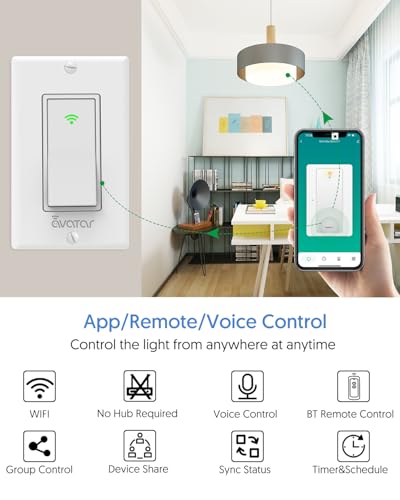
- Smart App & Bluetooth Remote Control – This key smart switch connects via WiFi & Bluetoo…
- Voice-Activated Hands-Free Control – Compatible with Alexa & Google Assistant, enabling …
- Single Pole, No Hub Required – Designed for single pole one-way circuits, this interrupt…
What You’ll Need
- Smart Light Switches (e.g., Smart Light Switch with Bluetooth Remote)
- Smartphone with the Smart Life App installed
- Wi-Fi connection (2.4GHz)
- Neutral wire (required for most smart switches)
- Screwdriver for installation
- Electrical tape (optional, for safety)
Step-by-Step
- Turn Off Power: Before starting any installation, ensure the power to the circuit is turned off at the breaker box to avoid electrical shock.
- Install the Smart Switches: Follow the manufacturer’s instructions to replace existing switches with your smart switches. Ensure that the neutral wire is connected correctly as it is essential for operation.
- Download the Smart Life App: If you haven’t already, download the Smart Life App on your smartphone. This app will be used to configure and control your smart switches.
- Add Smart Switches to the App: Open the Smart Life App, create an account if needed, and follow the prompts to add your new smart switches. Make sure your phone is connected to the 2.4GHz Wi-Fi network.
- Group the Switches: In the Smart Life App, navigate to the “Devices” section, select the switches you want to group, and choose the option to create a group. You can name the group based on the room or function, like “Living Room Lights.”
- Set Up Voice Control: Link the Smart Life App to your Alexa or Google Assistant account. Follow the instructions in the app to enable voice control for your grouped switches.
- Create Scenes: Use the Smart Life App to create lighting scenes for different activities (e.g., movie night, dinner). This allows you to customize how lights behave when you use voice commands.
- Test the Setup: Once everything is configured, test the voice commands to ensure that all grouped switches respond as expected. For example, say “Alexa, turn on Living Room Lights.”
Pro Tips for Better Results
- Smart App & Bluetooth Remote Control – This key smart switch connects via WiFi & Bluetoo…
- Voice-Activated Hands-Free Control – Compatible with Alexa & Google Assistant, enabling …
- Single Pole, No Hub Required – Designed for single pole one-way circuits, this interrupt…
- Ensure your Wi-Fi signal is strong in the areas where the switches are installed to avoid connectivity issues.
- Regularly update the Smart Life App to benefit from new features and improvements.
- Consider using a Bluetooth remote for local control, especially in areas with weak Wi-Fi signals.
- Group switches by functionality or room to make voice commands more intuitive.
Common Mistakes
- Not using a neutral wire, which is often required for smart switches to function properly.
- Failing to secure connections, leading to intermittent issues with switch responsiveness.
- Not grouping switches correctly in the app, which may result in commands not working as intended.
- Ignoring firmware updates that may enhance functionality and security.
Troubleshooting
- If switches are unresponsive, check the power supply and ensure that the circuit breaker is turned on.
- For connectivity issues, ensure your smartphone is connected to the correct Wi-Fi network.
- If voice commands are not recognized, ensure that the Smart Life app is linked correctly to your voice assistant.
- Restart the smart switch and your router to reset connections.
Maintenance / Next-Time Checklist
- Regularly check for updates in the Smart Life App.
- Inspect the physical connections of the smart switches to ensure they are secure.
- Test voice commands periodically to confirm they are functioning correctly.
- Keep the app and your smartphone’s operating system updated for optimal performance.
Recommended Products & Tools
- Smart Light Switch with Bluetooth Remote: This switch offers both Wi-Fi and Bluetooth control, ensuring functionality even when Wi-Fi is down.
- Smart Dimmer Switch: Perfect for creating customized lighting scenes and adjusting brightness easily.
- Smart Switch with App Control: Allows for remote access and scheduling, enhancing convenience and security.
FAQ
- Do I need a hub for my smart switches? No, most modern smart switches, like the ones mentioned, operate without a separate hub.
- Can I use smart switches with existing light fixtures? Yes, as long as the wiring is compatible and you have a neutral wire.
- What happens if my Wi-Fi goes down? You can still control your smart switches locally using Bluetooth remotes if available.
- Can I group switches in different rooms? Yes, you can create groups based on your preference regardless of their physical location.
- Are smart switches compatible with all types of bulbs? They generally work with standard incandescent and LED bulbs but check compatibility with specific models.
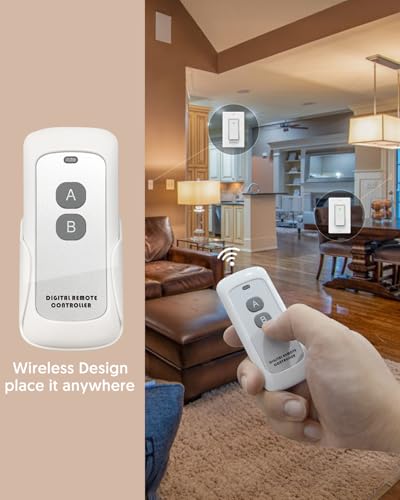
- 【Smart Switch with Remote Control】 Alexa light switch makes all your common household ap…
- 【Voice Control】The AvatarControls smart switch compatible with Alexa and Google Home. Co…
- 【Time Schedule】Avatar Controls WiFi switch, use timer and schedule function to set your …
Wrap-Up
Grouping smart switches for room voice control can significantly enhance your smart home experience, providing convenience and comfort. By following the steps outlined in this guide, you can easily set up your switches to work together seamlessly. Remember to regularly maintain your devices and troubleshoot any issues that arise to ensure a smooth operation of your smart home system.
Recommended Products & Tools
- Smart App & Bluetooth Remote Control – This key smart switch connects via WiFi & Bluetoo…
- Voice-Activated Hands-Free Control – Compatible with Alexa & Google Assistant, enabling …
- Single Pole, No Hub Required – Designed for single pole one-way circuits, this interrupt…

- 【Smart Switch with Remote Control】 Alexa light switch makes all your common household ap…
- 【Voice Control】The AvatarControls smart switch compatible with Alexa and Google Home. Co…
- 【Time Schedule】Avatar Controls WiFi switch, use timer and schedule function to set your …

- 【2-Gang Design】Seamless installation of two switches are now made possible. Control two …
- 【Easy Guided Install】Neutral wire is required. No need to understand complex switch wiri…
- 【App & Voice Control】Control your connected lights from anywhere, anytime, with the Kasa…

- Note: SY1 is a switch without any protection such as overcurrent or leakage. Complies wi…
- Applicable Current Scenarios: AC1, applied to circuits controlling heaters, incandescent…
- Universal Home DIY Mode: With the SY1 smart switch, it can convert small household appli…

- Smart Dimming & Remote Control: Adjust brightness from 0–100% using the included Bluetoo…
- Voice Control Ready: Compatible with Alexa and Google Assistant via Smart Life app (Blue…
- Custom Schedules & Timers: Set personalized lighting schedules, sunrise/sunset timers, a…

- 【Easy to Install】Not a dimmer, Neutral wire required, 2.4GHz Wi-Fi connection only (Not …
- 【Single-Pole or 3-Way】This smart switch 3 way can be installed for 3-way or single pole …
- 【Smart Voice Control】This smart 3 way light switch works with Amazon Alexa and Google As…
