How To Check Thermostat Compatibility Before Buying
Installing a new thermostat can enhance your home’s heating and cooling efficiency. In this guide, you will learn how to check thermostat compatibility before making a purchase, ensuring a smooth installation process. Remember to turn off your HVAC system before handling any electrical components for safety.
Disclosure: As an Amazon Associate I earn from qualifying purchases at no cost for you.

- Tamper Proof Thermostat for landlord and commerical property owners
- Renters/Guest can not set heat over 72 degrees
- Renters/Guests can not set AC below 72 degrees
What You’ll Need
- Current thermostat model information
- HVAC system specifications
- Screwdriver (flathead and Phillips)
- Smartphone or camera (for taking pictures)
- Measuring tape (optional)
Step-by-Step
- Identify Your Current Thermostat: Remove your existing thermostat cover and take note of the model number. This will help you understand the type of system you currently have.
- Check System Type: Determine whether your HVAC system is a furnace, boiler, heat pump, or another type. Different thermostats are designed to work with specific systems, so knowing yours is crucial.
- Examine Wiring Configuration: Take a picture of the wiring configuration. Most thermostats will have labeled wires (e.g., R, W, Y, G). Compare these labels with the specifications of the new thermostat you are considering.
- Note Voltage Requirements: Check whether your system operates on low voltage (24V) or high voltage (120V or 240V). Many modern thermostats are designed for low-voltage systems.
- Look for Additional Features: If you want a programmable or smart thermostat, ensure that your HVAC system supports these features. Some thermostats, like the CT72 and CT74, have specific functionalities that may not be compatible with all systems.
- Consult Manufacturer Guidelines: Review the manufacturer’s compatibility guidelines for the thermostat you wish to buy. Look for any limitations regarding electric baseboards or high voltage systems.
- Consider User Restrictions: If you are looking at tamper-proof models like the CT72 or CT100, ensure that the restrictions on temperature settings align with your needs and those of your tenants or guests.
- Purchase and Prepare for Installation: Once you confirm compatibility, purchase the thermostat and gather your tools for installation. Ensure that you have a clear workspace and follow the manufacturer’s installation instructions carefully.
Pro Tips for Better Results
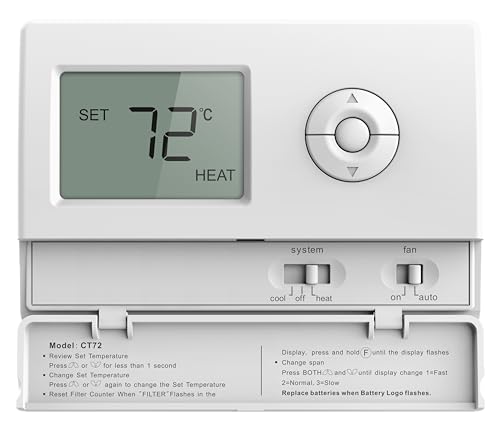
- Tamper Proof Thermostat for landlord and commerical property owners
- Renters/Guest can not set heat over 72 degrees
- Renters/Guests can not set AC below 72 degrees
- Always double-check the wiring before connecting to avoid any damage to the thermostat or HVAC system.
- If you are unsure about any step, consider consulting a professional HVAC technician for assistance.
- Keep the installation manual handy throughout the process for reference.
Common Mistakes
- Overlooking voltage compatibility, which can lead to system failure.
- Failing to take note of wire labels, resulting in incorrect connections.
- Not considering future needs, such as programmable features that may enhance energy efficiency.
Troubleshooting
- If the thermostat does not power on, check the wiring connections again.
- Ensure that the HVAC system is receiving power and is operational.
- If temperature settings are not responding, revisit the user manual for specific troubleshooting tips related to your model.
Maintenance / Next-Time Checklist
- Regularly check the thermostat settings to ensure they align with your heating and cooling needs.
- Inspect wiring connections yearly to prevent any loose wires from causing issues.
- Update firmware if applicable, especially for smart thermostats, to ensure optimal performance.
Recommended Products & Tools
The CT72 Basic Tamper Proof Thermostat is ideal for landlords and commercial property owners who want to restrict temperature settings for renters. It is compatible with most heating systems, making it a versatile choice. The CT100 offers a 7-day programmable schedule, which is beneficial for those seeking energy efficiency while managing a rental property.
FAQ
- How do I know if my thermostat is compatible with a heat pump?
Check the thermostat specifications to ensure it supports heat pumps, as some models only work with specific types. - Can I install a smart thermostat with my current wiring?
It depends on your existing wiring and system type. Review compatibility guidelines before purchasing. - What should I do if my thermostat isn’t working after installation?
Verify the wiring connections and ensure the HVAC system is powered on. Refer to the troubleshooting section. - Are there any specific thermostats for electric baseboard heating?
Yes, but many standard thermostats, like the CT74, do not support electric baseboards, so check compatibility before buying. - Can I use a programmable thermostat in a rental property?
Yes, but consider tamper-proof options to prevent tenants from changing settings.
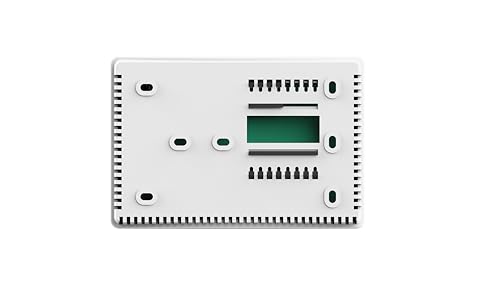
- Tamper Proof Thermostat for landlord and commerical property owners
- Renters/Guest can not set heat over 74 degrees
- Renters/Guests can not set AC below 74 degrees
Wrap-Up
Checking thermostat compatibility is essential to ensure a successful installation and efficient operation of your HVAC system. By following these steps and tips, you can confidently choose the right thermostat that meets your needs. Whether you’re a homeowner or a landlord, understanding your system’s requirements will save time and enhance comfort.
Recommended Products & Tools
- Tamper Proof Thermostat for landlord and commerical property owners
- Renters/Guest can not set heat over 72 degrees
- Renters/Guests can not set AC below 72 degrees
- Tamper Proof Thermostat for landlord and commerical property owners
- Renters/Guest can not set heat over 74 degrees
- Renters/Guests can not set AC below 74 degrees

- Tamper Proof Thermostat for landlord and commerical property owners
- Renters/Guest can not set heat over 72 degrees
- Renters/Guests can not set cool below 75 degrees

