How To Check Door Compatibility Before Buying A Smart Lock
Choosing the right smart lock for your door is crucial for ensuring security and convenience. In this guide, you will learn how to assess your door’s compatibility with smart locks, specifically focusing on products like the Philips WiFi Keypad Door Lock. Before proceeding, it’s important to consider that improper installation can compromise your home’s security, so accurate measurements and assessments are essential.
Disclosure: As an Amazon Associate I earn from qualifying purchases at no cost for you.

- Connect to 2.4GHz WiFi, No Hub Needed:Connect your Philips 4200 Series Wifi Door Lock De…
- App Control with Real-Time Access:Control smart lock remotely via the Philips Home Acces…
- Voice Assistant Compatible:Hands full? No problem. Use voice commands with Alexa or Goog…
What You’ll Need
- Tape measure
- Phillips screwdriver
- Smart lock product specifications (e.g., from the manufacturer’s website)
- Smartphone (for app-controlled locks)
- Notepad and pen (for taking notes)
Step-by-Step
- Measure Your Door Thickness: Use a tape measure to determine the thickness of your door. Most smart locks are designed for doors between 1.375 inches to 2 inches thick. If your door is outside this range, you may need additional hardware or a different lock.
- Check the Backset Measurement: Measure the distance from the edge of the door to the center of the existing hole where the lock is installed. Common backsets are 2.5 inches and 2.75 inches. Ensure the smart lock you choose supports your door’s backset measurement.
- Inspect the Door Material: Identify the material of your door (wood, metal, fiberglass, etc.). Some smart locks are better suited for specific materials. For example, wooden doors may require different installation techniques than metal doors.
- Evaluate the Door Handing: Determine whether your door is left-handed or right-handed. This affects how the smart lock will be installed, as the orientation of the handle can differ between door types.
- Check for Existing Hardware: Remove the current lock and inspect the mounting holes. Ensure that the new smart lock can fit into these holes without additional drilling. Also, look for any obstructions like a doorbell or decorative panel that may hinder installation.
- Review Smart Lock Features: Make sure the features of the smart lock you are considering match your needs. For instance, if you want remote access, ensure the lock has built-in Wi-Fi or Bluetooth capabilities.
- Consult the Manufacturer’s Guidelines: Refer to the installation instructions and compatibility guidelines provided by the smart lock manufacturer. This will give you specific requirements and recommendations.
- Consider Additional Security Features: Assess whether the smart lock includes features that enhance security, such as auto-lock, real-time alerts, and emergency power options. These can significantly improve your home’s security.
Pro Tips for Better Results

- Connect to 2.4GHz WiFi, No Hub Needed:Connect your Philips 4200 Series Wifi Door Lock De…
- App Control with Real-Time Access:Control smart lock remotely via the Philips Home Acces…
- Voice Assistant Compatible:Hands full? No problem. Use voice commands with Alexa or Goog…
- Take multiple measurements to ensure accuracy.
- Consider consulting a locksmith if you’re unsure about the compatibility or installation process.
- Read reviews about the smart lock you are considering to understand the experiences of other users.
- Check if the smart lock requires specific types of batteries and plan for their replacement.
Common Mistakes
- Failing to accurately measure the door’s thickness and backset.
- Overlooking compatibility with door materials or existing hardware.
- Not reviewing the smart lock’s features before purchase.
- Neglecting to check if the lock can be installed on both left and right-handed doors.
Troubleshooting
- If the lock does not fit, double-check your measurements against the manufacturer’s specifications.
- If the smart lock is not responding, ensure that it is properly connected to your Wi-Fi network or that the batteries are installed correctly.
- If installation seems complicated, refer back to the installation manual, or consider seeking professional assistance.
Maintenance / Next-Time Checklist
- Regularly check the batteries and replace them as needed.
- Ensure that the lock’s mechanical parts are functioning smoothly; lubricate if necessary.
- Update the smart lock firmware through the app to ensure you have the latest features and security updates.
- Review user access and delete any unused codes or fingerprints periodically.
Recommended Products & Tools
When considering smart locks, products like the Philips WiFi Keypad Door Lock stand out due to their built-in Wi-Fi and multiple unlocking options. Additionally, tools like a Phillips screwdriver and tape measure are essential for installation and ensuring compatibility. Having the right tools makes the installation process smoother and more efficient.
FAQ
- What if my door is not compatible with the smart lock?
If your door doesn’t meet the smart lock’s specifications, consider consulting a locksmith or looking for a lock designed for your specific door type. - Can I install a smart lock myself?
Yes, most smart locks are designed for DIY installation, but ensure you follow the manufacturer’s instructions carefully. - What features should I look for in a smart lock?
Look for features like remote access, auto-lock, voice control, and multiple unlocking methods to enhance convenience and security. - How often should I check my smart lock’s batteries?
Check the batteries every few months, or whenever you receive a low battery alert through the app, to ensure consistent operation. - Can I use a smart lock with a rental property?
Yes, smart locks are ideal for rental properties, allowing landlords to manage access easily and securely.
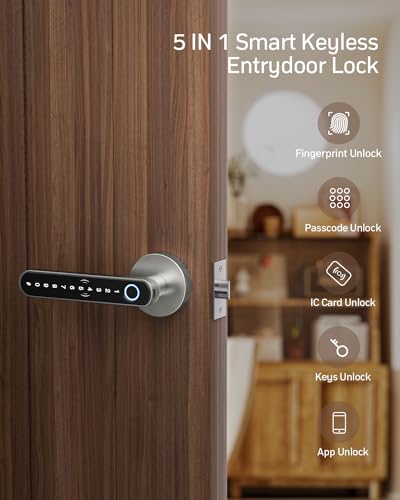
- [5 Multiple Ways To Unlock]: Fingerprint + Passcode + APP Control+ IC Cards (4 PCS for 1…
- [TUYA APP Smart Control]: You can lock/unlock door, share E-codes, check Log records, al…
- [Fingerprint Quick Unlock]: One touch unlock your door much more faster within 0.2 secon…
Wrap-Up
By following these steps to check door compatibility before purchasing a smart lock, you can ensure that your investment enhances your home security and convenience. Take your time to measure and assess your door accurately, and consider your specific needs when selecting a smart lock. With the right preparation, you can confidently upgrade your home’s security with a smart lock that fits perfectly.
Recommended Products & Tools
- Connect to 2.4GHz WiFi, No Hub Needed:Connect your Philips 4200 Series Wifi Door Lock De…
- App Control with Real-Time Access:Control smart lock remotely via the Philips Home Acces…
- Voice Assistant Compatible:Hands full? No problem. Use voice commands with Alexa or Goog…

- [5 Multiple Ways To Unlock]: Fingerprint + Passcode + APP Control+ IC Cards (4 PCS for 1…
- [TUYA APP Smart Control]: You can lock/unlock door, share E-codes, check Log records, al…
- [Fingerprint Quick Unlock]: One touch unlock your door much more faster within 0.2 secon…

- Smart User Management: Our smart user management system empowers you to take full, remot…
- 8-in-1 Smart Unlock & Locking: Unlock via fingerprint (Swedish FPC tech), App, authorize…
- Self-learning AI Fingerprint Recognition: Unlock your door in a blink with our advanced …

- [Unlock Your Door with 6-In-1 Versatility] Experience unparalleled convenience and secur…
- [Quick and Effortless Installation] Say goodbye to complicated installations and time-co…
- [Convenient Access Management via the App] Take complete control of access management wi…

- 【Lock-Side Programming】Add, delete, and store relevant data directly on the lock. Passwo…
- 【Built-in Wi-Fi Function】✅3 Core Benefits: 1.Doorbell-triggered remote unlocking (active…
- 【Home & Office Security】Remote unlocking requires no credential sharing with others—ever…

- 𝐅𝐥𝐞𝐱𝐢𝐛𝐥𝐞 𝐖𝐚𝐲𝐬 𝐭𝐨 𝐔𝐧𝐥𝐨𝐜𝐤: Unlock the way you want: app, passcode, fingerprint, physical k…
- 𝐔𝐧𝐥𝐨𝐜𝐤 𝐅𝐫𝐨𝐦 𝐀𝐧𝐲𝐰𝐡𝐞𝐫𝐞: Built-in Wi-Fi lets you lock and unlock your door remotely anytime…
- 𝗩𝗼𝗶𝗰𝗲 𝗖𝗼𝗻𝘁𝗿𝗼𝗹 𝗥𝗲𝗮𝗱𝘆: Pair with Alexa or Google Assistant to unlock or lock with your voi…

