How To Automate Porch Lights With A Smart Switch
Automating your porch lights with a smart switch can enhance your home’s security and convenience. By the end of this guide, you will have a fully functional system that allows you to control your outdoor lighting easily. Before starting, ensure you follow all electrical safety precautions, including turning off power at the circuit breaker.
Disclosure: As an Amazon Associate I earn from qualifying purchases at no cost for you.
Editor’s Pick
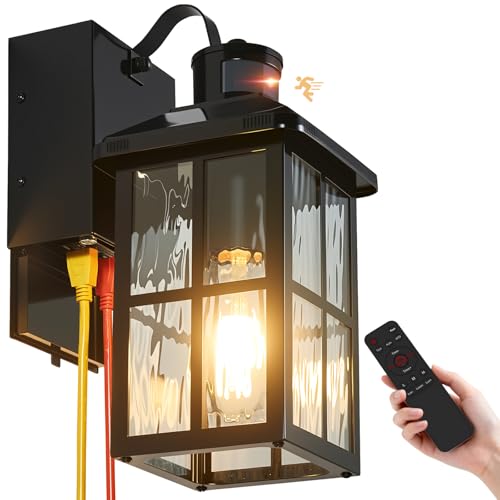
Porch Light with GFCI Outlet with Remote, Dusk to Dawn Outdoor Lighting with Outlet, Upgraded 4 Lighting Modes Motion Sensor Outdoor Lights, Waterproof Outside Lights for House Patio Garage Front Door
- 【Upgraded Adjustable Sensitivity and Timer】The porch light with outlet has 4 modes to me…
- 【Safer and Power GFCI Outlet】This dusk to dawn outdoor lighting features two GFCI outlet…
- 【4 Smart Lighting Modes】The outdoor wall sconce has 4 modes to meet various needs: ① Tes…
What You’ll Need
- Smart light switch (e.g., Kasa Matter Smart Light Switch or Amazon Basics Smart Light Switch)
- Compatible porch light fixture with GFCI outlet (e.g., Porch Light with GFCI Outlet with Remote)
- Basic tools (screwdriver, wire stripper, electrical tape)
- Smartphone with the corresponding app for the smart switch
- Wi-Fi connection (2.4GHz)
Step-by-Step
- Turn Off Power: Begin by turning off the power to the existing light switch at the circuit breaker to ensure safety during installation.
- Remove Existing Switch: Unscrew the cover plate of the existing switch and disconnect the wires from the switch. Keep track of which wire connects to which terminal.
- Connect the Smart Switch: Follow the instructions provided with your smart switch for connecting wires. Typically, you will connect the line (power), load (light), and ground wires to the corresponding terminals on the smart switch.
- Install the Smart Switch: Secure the smart switch back into the wall box and attach the cover plate. Ensure that it is properly mounted and looks neat.
- Set Up the App: Download the app for your smart switch on your smartphone. Follow the in-app instructions to connect the switch to your Wi-Fi network.
- Pair with Porch Light: Install your chosen porch light fixture with the GFCI outlet. Make sure it is positioned correctly and securely mounted.
- Connect Devices: Plug in any devices you want to control (like holiday lights or security cameras) into the GFCI outlet of your porch light fixture.
- Test the System: Turn the power back on at the circuit breaker and test the smart switch from the app to ensure everything is functioning as expected.
Pro Tips for Better Results
Porch Light with GFCI Outlet with Remote, Dusk to Dawn Outdoor Lighting with Outlet, Upgraded 4 Lighting Modes Motion Sensor Outdoor Lights, Waterproof Outside Lights for House Patio Garage Front Door

- 【Upgraded Adjustable Sensitivity and Timer】The porch light with outlet has 4 modes to me…
- 【Safer and Power GFCI Outlet】This dusk to dawn outdoor lighting features two GFCI outlet…
- 【4 Smart Lighting Modes】The outdoor wall sconce has 4 modes to meet various needs: ① Tes…
- Ensure your smart switch is compatible with your existing home automation system for seamless integration.
- Consider using dimmable LED bulbs for your porch light for better energy efficiency and ambiance control.
- Set schedules or timers within the app to automate your porch lights based on your routine.
Common Mistakes
- Not turning off power at the circuit breaker before starting installation, which can lead to electrical accidents.
- Incorrectly connecting wires, which can cause the smart switch to malfunction or damage the device.
- Failing to test the GFCI outlet after installation, which may lead to unprotected devices in outdoor use.
Troubleshooting
- If the smart switch doesn’t respond, ensure your Wi-Fi connection is stable and within range.
- Check the wiring connections to ensure they are secure and correctly placed.
- If the GFCI outlet trips, check for any devices drawing excessive power or short circuits.
Maintenance / Next-Time Checklist
- Regularly test the GFCI outlet by pressing the TEST and RESET buttons to ensure it is functioning correctly.
- Check the smart switch and porch light for any signs of wear or damage, especially after severe weather.
- Update the app and firmware of the smart switch periodically to benefit from new features or improvements.
Recommended Products & Tools
- Kasa Matter Smart Light Switch: Offers voice control and compatibility with various smart home platforms, making it a versatile choice.
- Porch Light with GFCI Outlet: Provides additional safety with built-in GFCI protection and remote control for convenience.
- Basic Tools: A screwdriver and wire stripper are essential for easy installation and ensuring secure connections.
FAQ
- Can I use any porch light with a smart switch? No, ensure your porch light is compatible with the smart switch and has a GFCI outlet for safety.
- What if my Wi-Fi connection is weak? Consider using a Wi-Fi extender to ensure connectivity for your smart devices.
- How often should I test the GFCI outlet? It is recommended to test it monthly to ensure it is functioning properly.
- Can I control my porch lights remotely? Yes, if your smart switch is connected to Wi-Fi, you can control it from anywhere using the app.
- What should I do if my lights flicker? Check if the bulbs are compatible; using non-dimmable bulbs in a dimmable fixture can cause flickering.
YJXGDIL Porch Light with GFCI Outlet: Motion Sensor Porch Lights Outdoor with Remote Control Dusk to Dawn Exterior Lighting Fixtures Black Modern Outdoor Wall Lights for House Garage Patio Front Door

- 【Smart Remote Control】——Effortlessly manage your outdoor lighting from up to 20 feet awa…
- 【GFCI-Protected Dual Outlets】——Featuring two weatherproof GFCI outlets (2-prong/3-prong …
- 【Upgraded 4 Lighting Modes】——① Manual(ON/OFF) Mode: Always Off or always On; ② DTD(Dusk …
Wrap-Up
Automating your porch lights with a smart switch not only enhances convenience but also adds a layer of security to your home. By following this guide, you can easily control your outdoor lighting, making it functional and stylish. Remember to regularly maintain your setup for optimal performance and safety.
Recommended Products & Tools
Porch Light with GFCI Outlet with Remote, Dusk to Dawn Outdoor Lighting with Outlet, Upgraded 4 Lighting Modes Motion Sensor Outdoor Lights, Waterproof Outside Lights for House Patio Garage Front Door
- 【Upgraded Adjustable Sensitivity and Timer】The porch light with outlet has 4 modes to me…
- 【Safer and Power GFCI Outlet】This dusk to dawn outdoor lighting features two GFCI outlet…
- 【4 Smart Lighting Modes】The outdoor wall sconce has 4 modes to meet various needs: ① Tes…
YJXGDIL Porch Light with GFCI Outlet: Motion Sensor Porch Lights Outdoor with Remote Control Dusk to Dawn Exterior Lighting Fixtures Black Modern Outdoor Wall Lights for House Garage Patio Front Door

- 【Smart Remote Control】——Effortlessly manage your outdoor lighting from up to 20 feet awa…
- 【GFCI-Protected Dual Outlets】——Featuring two weatherproof GFCI outlets (2-prong/3-prong …
- 【Upgraded 4 Lighting Modes】——① Manual(ON/OFF) Mode: Always Off or always On; ② DTD(Dusk …
Kasa Matter Smart Light Switch: Voice Control w/Siri, Alexa & Google Assistant | UL Certified | Timer & Schedule | Easy Guided Install | Neutral Wire Required | Single Pole | 2.4GHz Wi-Fi | KS205

- 【Ultimate Flexibility with Matter】Matter unifies your smart home, offering cross-platfor…
- 【Voice Control】Enjoy the hands-free convenience of controlling the lights in your home w…
- 【Control From Anywhere】Monitor your light status. Turn electronics on and off from anywh…
Amazon Basics Smart Light Switch, Single Pole, Works with Alexa Only, Voice Control, Schedule, 2.4 GHz Wi-Fi, No Hub Required, Easy to Install, White

- SMART UPGRADE: Transform your home by upgrading to a smart switch that works seamlessly …
- GUIDED INSTALLATION: Enjoy a guided installation with our step-by-step video and user ma…
- FLEXIBLE SCHEDULING: Take control of your home lighting by scheduling lights to turn on …
Myhaptim Porch Lights with GFCI Outlet,Dusk to Dawn Motion Sensor Outdoor Lights,3 Lighting Modes Black Front Door Light,Waterproof Exterior Light Fixture,Outside Wall Lamp for House Patio Garage

- Built-In 2 GFCI Outlet: The porch light has 2 GFCI outlets (Ground Fault Interrupter) fo…
- 3 Light Modes: The upgraded outdoor light fixture 3 lighting modes and a built-in dusk-t…
- Recommended Bulb & E26 Base: Our outdoor wall lamp does not include a bulb and uses a E2…
2 Pack Porch Lights with GFCI Outlet, Dusk to Dawn Motion Sensor Outdoor Lights, 3 Lighting Modes Waterproof Anti-Rust Alunmium Outside Porch Wall Light, Exterior Light Fixture for Garage Front Door

- Upgraded Downward Built-in Outlet: Our motion sensor outdoor lights are equipped with an…
- 2 Lighting Modes: This outdoor porch light offers versatile lighting options to suit you…
- Anti-Rust, Waterproof: Our outdoor lights are crafted from 100% heavy-duty die-cast alum…
