Battery Life Tips For Door And Window Sensors
In this guide, you will learn practical tips to extend the battery life of your door and window sensors, ensuring they remain functional and reliable for your home security needs. We’ll cover essential steps, common mistakes, and maintenance routines. Always prioritize safety by ensuring your sensors are installed correctly to avoid any operational interruptions.
Disclosure: As an Amazon Associate I earn from qualifying purchases at no cost for you.

- Home Automation: The smart sensor can control GoveeLife intelligent devices in the same …
- Maximum Compatibility: The GoveeLife Smart Door Window Sensor supports 50 GoveeLife smar…
- Stable Connection: GoveeLife equipment (sold separately) and a 2.4 GHz Wi-Fi network con…
What You’ll Need
- Door and window sensors (e.g., GoveeLife Door Window Sensor)
- Quality batteries (e.g., Enegitech CR123A for reliable power)
- Adhesive tape or mounting screws for installation
- Smart home hub (if applicable, like Tuya Zigbee Hub)
- Smartphone or tablet for app notifications
Step-by-Step
- Choose the Right Sensor: Select a door or window sensor that fits your needs. Ensure compatibility with your existing smart home devices.
- Install Properly: Follow the manufacturer’s instructions for installation. Use adhesive backing or screws for secure placement, ensuring the sensor aligns with the magnetic counterpart.
- Optimize Placement: Position sensors within the recommended range of your smart hub (e.g., 80m for GoveeLife) to maintain a stable connection.
- Minimize Usage of High-Power Features: If your sensor has features like constant monitoring or alerts, consider using them sparingly to conserve battery life.
- Regularly Check Battery Status: Use your smartphone app to monitor the battery level. Replace batteries promptly to prevent sensor failure.
- Adjust Sensitivity Settings: Lower the sensitivity if you notice frequent false alarms, which can drain battery life quickly.
- Keep Firmware Updated: Ensure your sensors and smart hub are running the latest firmware to benefit from performance improvements and battery optimizations.
- Consider Environmental Factors: Install sensors away from direct sunlight or extreme temperatures, as these conditions can affect battery performance.
Pro Tips for Better Results

- Home Automation: The smart sensor can control GoveeLife intelligent devices in the same …
- Maximum Compatibility: The GoveeLife Smart Door Window Sensor supports 50 GoveeLife smar…
- Stable Connection: GoveeLife equipment (sold separately) and a 2.4 GHz Wi-Fi network con…
- Utilize low-power sensors, as they are designed to conserve battery life.
- Group control multiple sensors to reduce the number of active connections at any given time.
- Invest in quality batteries, like Enegitech CR123A, known for their longevity and reliability.
- Regularly clean sensor areas to remove dust or debris that might interfere with functionality.
Common Mistakes
- Installing sensors in areas with poor Wi-Fi coverage, leading to frequent disconnections.
- Neglecting to replace batteries until after they fail, which can compromise security.
- Overlooking firmware updates that can enhance battery efficiency.
- Using incompatible batteries, which can lead to performance issues.
Troubleshooting
- If the sensor is not responding, check the battery installation and ensure it’s seated correctly.
- Verify the connection to the smart hub; reposition the hub or sensor if necessary.
- Reset the sensor according to the manufacturer’s instructions if it continues to malfunction.
- Consult the app for any alerts or troubleshooting suggestions specific to your device.
Maintenance / Next-Time Checklist
- Check battery levels monthly.
- Clean sensor surfaces to ensure accuracy.
- Review sensor placement and adjust as necessary.
- Update firmware quarterly to take advantage of improvements.
Recommended Products & Tools
Choosing the right products can significantly impact the efficiency of your door and window sensors. The GoveeLife Door Window Sensor is excellent for home automation, allowing you to control multiple devices seamlessly. The Enegitech CR123A Lithium Battery ensures long-lasting power, making it an ideal choice for security devices. For those with smart home setups, a Tuya Zigbee Hub facilitates smooth integration and communication between devices, enhancing overall performance.
FAQ
- How often should I replace the batteries in my sensors?
Check the battery status monthly and replace them as needed, typically every six to twelve months depending on usage. - Can I use rechargeable batteries?
It’s advisable to use non-rechargeable batteries unless the product specifies that it supports rechargeable options. - What if my sensor is not connecting to the hub?
Ensure it is within range and check for any obstructions. Restart the hub and the sensor, and re-establish the connection. - Will environmental factors affect battery life?
Yes, extreme temperatures and humidity can negatively impact battery performance, so install sensors in sheltered locations. - How can I improve the range of my sensors?
Ensure they are installed within the recommended distance from the hub and consider using a range extender if needed.

- Enegitech CR123A Lithium Battery Type: Non-rechargeable Lithium Battery, Voltage: 3V, Ca…
- Replace for: CR123, CR123A, CR17345, DL123A, EL123AP, K123LA, SF123A, VL123
- Wide Compatibility: Enegitech 123A battery is compatible with Flood Freeze Sensor, Smart…
Wrap-Up
By following these battery life tips for door and window sensors, you can enhance their functionality and reliability. Regular maintenance, proper installation, and the right product choices play a crucial role in ensuring your home security systems remain effective. Stay proactive about battery management to enjoy uninterrupted protection for your home.
Recommended Products & Tools
- Home Automation: The smart sensor can control GoveeLife intelligent devices in the same …
- Maximum Compatibility: The GoveeLife Smart Door Window Sensor supports 50 GoveeLife smar…
- Stable Connection: GoveeLife equipment (sold separately) and a 2.4 GHz Wi-Fi network con…

- Enegitech CR123A Lithium Battery Type: Non-rechargeable Lithium Battery, Voltage: 3V, Ca…
- Replace for: CR123, CR123A, CR17345, DL123A, EL123AP, K123LA, SF123A, VL123
- Wide Compatibility: Enegitech 123A battery is compatible with Flood Freeze Sensor, Smart…

- Small size, easy to install and concealment
- Flush mounted cylindrical magnetic contacts
- φ10mm 3/8" diameter press to fit
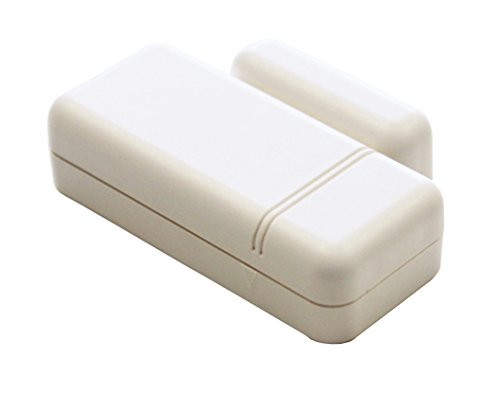
- ENCRYPTED SECURITY – Utilizes advanced S-Line encryption to securely transmit signals to…
- INSTANT ALERTS – Detects movement over 1 inch and notifies the IQ Panel immediately Idea…
- SMART HOME READY – Works with Alarm com to send text alerts and enable automation like t…

- 🔗 Wireless Intelligent Connection: Adopting Tuya Zigbee 3.0 technology, easy to connect …
- 📱 Real-time Alarm Push: Accurately monitor the opening and closing status of doors and w…
- 🎙️ Voice control compatible: support Alexa, Google Assistant voice query status, linkage…
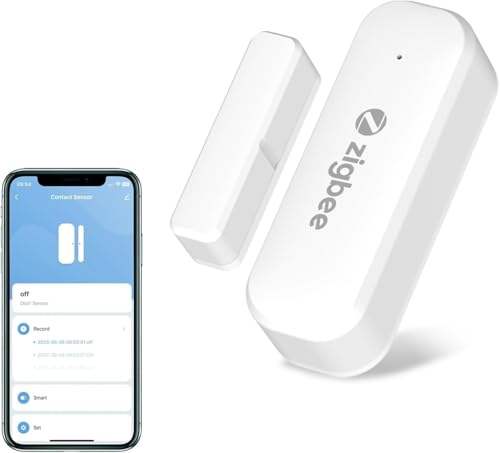
- 🔗 Wireless Intelligent Connection: Adopting Tuya Zigbee 3.0 technology, easy to connect …
- 📱 Real-time Alarm Push: Accurately monitor the opening and closing status of doors and w…
- 🎙️ Voice control compatible: support Alexa, Google Assistant voice query status, linkage…

