Avoid Power Strip Blocking Outlets
Using a power strip is a great way to maximize your outlet usage, especially when you have multiple devices to charge or power. However, improper placement of power strips can lead to blocked outlets, making it difficult to access other plugs. In this guide, you will learn how to effectively use power strips while avoiding the issue of blocked outlets, ensuring that all your devices can be powered conveniently.
Disclosure: As an Amazon Associate I earn from qualifying purchases at no cost for you.

- ★Multi Function Power Strip: Power strip surge protector with 12AC outlets & 4 USB charg…
- ★Surge Protector Power Strip with usb: 2 Special design widely spacing AC outlets (2 inc…
- ★12 AC Surge Protector Outlets: The 3 level complementary Surge Protector Circuit which …
Before proceeding, always remember to prioritize safety. Ensure that your power strip is rated for the devices you plan to connect and avoid overloading it to prevent any electrical hazards.
What You’ll Need
- A power strip with multiple outlets and USB ports, such as the ALESTOR Surge Protector.
- Extension cords for additional reach if necessary.
- Wall-mounting tools (if applicable).
- Space for organizing cables.
Step-by-Step
- Choose the Right Power Strip: Select a power strip that has widely spaced outlets to accommodate bulky plugs without blocking adjacent sockets. For instance, the ALESTOR Surge Protector features 12 outlets with 2 inches of space between them.
- Assess Your Outlet Layout: Before plugging in your power strip, analyze the layout of your outlets. Identify which outlets are most accessible and which might be blocked by furniture or other devices.
- Positioning: Place your power strip in a location that allows easy access to all outlets. If using a flat plug power strip, position it at a 45-degree angle to avoid blocking the lower outlet.
- Mounting (If Necessary): If you have limited space, consider wall-mounting your power strip. Many models, like the TROND Surge Protector, come with mounting tabs that allow for secure installation.
- Connect Devices Wisely: When plugging in devices, start with the larger adapters first. This way, you can fill in the smaller plugs around them without blocking any outlets.
- Utilize USB Ports: If your power strip has USB ports, use them for devices like phones and tablets. This frees up AC outlets for larger devices.
- Check for Overloading: Ensure that the total wattage of all connected devices does not exceed the power strip’s limits. Most strips will indicate the maximum load capacity.
- Regularly Inspect Cables: Periodically check your power strip and cables for any signs of wear or damage. Replace any faulty equipment to maintain safety.
Pro Tips for Better Results

- ★Multi Function Power Strip: Power strip surge protector with 12AC outlets & 4 USB charg…
- ★Surge Protector Power Strip with usb: 2 Special design widely spacing AC outlets (2 inc…
- ★12 AC Surge Protector Outlets: The 3 level complementary Surge Protector Circuit which …
- Use cable organizers to keep cords tidy and prevent tangling.
- Label cords if necessary, especially in shared spaces, to avoid confusion.
- Consider power strips with built-in surge protection to safeguard your devices against power spikes.
- Keep your power strip accessible for easy unplugging in case of emergencies.
Common Mistakes
- Overloading the power strip by connecting too many high-wattage devices.
- Placing the power strip in hard-to-reach locations, making it inconvenient to use.
- Using non-surge-protected strips for sensitive electronics, risking damage.
- Ignoring the spacing of outlets, leading to blocked access.
Troubleshooting
- If devices are not charging, check that the power strip is switched on and plugged in properly.
- Inspect for any tripped circuit breakers or blown fuses if the power strip is unresponsive.
- Ensure that devices are compatible with the power strip’s voltage and wattage ratings.
- Rearrange plugs if you encounter difficulty accessing certain outlets.
Maintenance / Next-Time Checklist
- Regularly clean the power strip and outlet area to prevent dust accumulation.
- Test the power strip’s functionality by plugging in a known working device.
- Review your devices to see if any can be replaced with more compact options.
- Consider upgrading to a power strip with more features based on your usage.
Recommended Products & Tools
- ALESTOR Surge Protector: Offers multiple outlets and USB ports, ideal for large setups without blocking adjacent outlets.
- HOPOW Flat Plug Extension Cord: Its ultra-thin design prevents blocking neighboring outlets, making it perfect for tight spaces.
- TROND Surge Protector: Features widely spaced outlets, allowing for better organization of bulky plugs.
- Mounting Hardware: Essential for wall-mounting power strips in workspaces to save floor space.
FAQ
- Can I use a power strip with a surge protector for sensitive electronics?
Yes, it is advisable to use a power strip with surge protection to safeguard sensitive devices from power surges. - How do I know if my power strip is overloaded?
Most power strips have a maximum wattage limit; ensure that the total wattage of devices plugged in does not exceed this limit. - Is it safe to daisy-chain power strips?
Generally, it is not recommended to daisy-chain power strips as it can lead to overheating and fire hazards. - How often should I replace my power strip?
Replace your power strip if it shows signs of wear or damage, or if it is over five years old. - Can I use a power strip outside?
Only use power strips that are rated for outdoor use; standard power strips are not designed to withstand outdoor conditions.
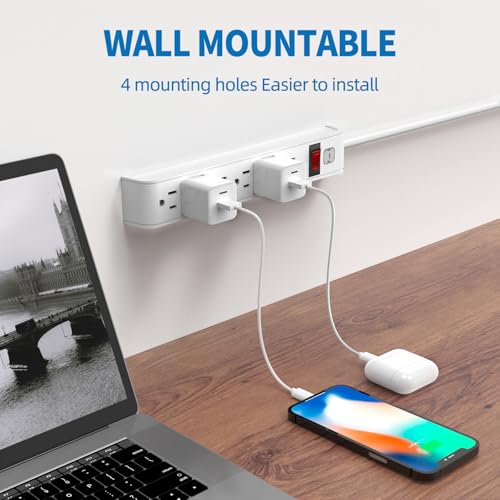
- 【6-Outlet Surge Protector Power Strip】: 6 AC outlets with surge protection , protect you…
- 【High Quality Power Strip】: Adopts ABS+PC fire-resistant material, prevent fire and high…
- 【Wall Mount Outlet Strip】: Four solid mounting holes on the back, make it easier to inst…
Wrap-Up
By following these steps, you can effectively use power strips without blocking outlets, ensuring that all your devices remain accessible and powered. Prioritize safety and organization to create an efficient workspace or living area. With the right approach, power strips can significantly enhance your electrical setup while keeping everything convenient and safe.
Recommended Products & Tools
- ★Multi Function Power Strip: Power strip surge protector with 12AC outlets & 4 USB charg…
- ★Surge Protector Power Strip with usb: 2 Special design widely spacing AC outlets (2 inc…
- ★12 AC Surge Protector Outlets: The 3 level complementary Surge Protector Circuit which …

- 【6-Outlet Surge Protector Power Strip】: 6 AC outlets with surge protection , protect you…
- 【High Quality Power Strip】: Adopts ABS+PC fire-resistant material, prevent fire and high…
- 【Wall Mount Outlet Strip】: Four solid mounting holes on the back, make it easier to inst…

- 【8-IN-1 Power Strip & Wide Compatibility】Equipped with 4 AC outlets and 4 USB (2 USB-C) …
- 【Ultra Thin Flat Plug & 6Ft Extension Cord】With only a 0.33-inch ultra-thin plug, which …
- 【Wide Spaced Outlets & Anti-Slip Feet】The spacing between the sockets is 1.62in, wide sp…

- Heavy duty Safety: Designed for ultimate electrical safety, this surge protector power s…
- Industrial Grade Metal Housing: Crafted with durable metal housing, this weather resista…
- 6FT Cord & Wall Mount Design: Optimize your workspace with a 6FT extension cord that off…

- 【Power Strip with USB Ports and Cruise Must Haves】 The power strip with no surge protect…
- 【7-in-1 Charging Station with USB C】 Power up to 7 devices simultaneously with 3 AC outl…
- 【Flat Plug Power Strip with 6ft Braided Cord】Our small power strip can fit behind dresse…

- Desk power strip surge protector – ETL listed, this massive outlet expansion features 13…
- 13 widely spaced AC outlets – Extra space in-between(38mm vs. 30mm on other power strips…
- Power strip flat plug – Made of 14AWG pure copper, the 5-foot extension cord is heavy-du…
