Smart Sprinkler Troubleshooting Zones Not Running
In this guide, you will learn how to effectively troubleshoot your smart sprinkler system when specific zones are not running. By following the outlined steps, you will identify and resolve common issues that may prevent your system from functioning correctly. Remember, safety is key; always ensure your sprinkler system is powered off before conducting any checks to avoid electrical hazards.
Disclosure: As an Amazon Associate I earn from qualifying purchases at no cost for you.

- Intelligent Irrigation Control: The Orbit Smart Sprinkler Controller manages watering wi…
- Indoor/Outdoor Installation: Designed for versatile placement with a protective weatherp…
- Smart Scheduling & Management: Easily create custom irrigation schedules using an app co…
What You’ll Need
- Smartphone or tablet with the sprinkler app installed
- Access to your Wi-Fi network
- Screwdriver (if necessary for hardware checks)
- Multimeter for electrical diagnostics (optional)
- Water hose for manual testing
- Notebook or app for note-taking
Step-by-Step
- Check Power Supply: Ensure that your smart sprinkler controller is powered on. Inspect the power source and connections for any visible issues.
- Inspect App Settings: Open the app connected to your sprinkler system. Verify that the zones in question are activated and scheduled for watering.
- Examine Zone Connections: Physically check the wiring and connections for the non-functioning zones. Look for loose wires or corroded terminals that may disrupt the signal.
- Test the Zones Manually: Use the app or the controller to manually activate the zones. If they don’t activate, there may be an issue with the valve or wiring.
- Check Water Supply: Ensure that the water supply is turned on and that there are no kinks or blockages in the hoses leading to the zones.
- Look for Obstructions: Inspect the sprinkler heads for dirt, debris, or damage that might prevent proper operation.
- Reset the System: If issues persist, consider resetting your smart controller. Follow the manufacturer’s instructions for a safe reset.
- Consult the User Manual: Refer to the user manual for specific troubleshooting steps related to your model, as different systems may have unique requirements.
Pro Tips for Better Results

- Intelligent Irrigation Control: The Orbit Smart Sprinkler Controller manages watering wi…
- Indoor/Outdoor Installation: Designed for versatile placement with a protective weatherp…
- Smart Scheduling & Management: Easily create custom irrigation schedules using an app co…
- Regularly update your smart sprinkler app to ensure you have the latest features and bug fixes.
- Schedule routine checks of your sprinkler system at the beginning of each season to catch potential issues early.
- Consider implementing a rain sensor to automatically adjust watering schedules based on weather conditions.
Common Mistakes
- Ignoring scheduled maintenance checks, which can lead to larger issues down the line.
- Failing to check if the app is connected to the correct Wi-Fi network, causing communication errors.
- Overlooking simple fixes, such as ensuring the water supply is open or that there are no visible blockages.
Troubleshooting
If your zones are still not running after following the above steps, consider these additional troubleshooting techniques:
- Use a multimeter to check for voltage at the zone valves, ensuring they are receiving power.
- Look for any signs of leaks or damage in the irrigation lines that may affect flow.
- Check for firmware updates for your smart controller that may resolve connectivity or operational issues.
Maintenance / Next-Time Checklist
- Inspect and clean sprinkler heads regularly to prevent clogs.
- Check all wiring and connections at least once a season.
- Test the system after heavy rains or storms to ensure everything is functioning correctly.
- Keep the app updated and familiarize yourself with any new features or settings.
Recommended Products & Tools
Here are some tools and products that can help with your smart sprinkler system:
- Orbit B-hyve Smart Indoor/Outdoor Sprinkler Controller: This controller allows for remote management of your irrigation system, making it easy to adjust schedules and monitor zones from anywhere.
- AnseTo WiFi Sprinkler Timer: Featuring remote control and customizable settings, this timer ensures your garden is watered correctly, even when you’re away.
- Rain Bird ARC6 App-Based Indoor Smart WiFi Irrigation Timer: With its intuitive app, you can manage your sprinkler system from anywhere, ensuring optimal performance and water savings.
FAQ
1. Why are some zones not running in my smart sprinkler system?
Common reasons include power supply issues, app configuration errors, faulty wiring, or blocked sprinkler heads.
2. How can I reset my smart sprinkler controller?
Refer to the user manual for specific instructions, as the reset process can vary by model.
3. What should I do if my app won’t connect to the sprinkler system?
Ensure your smartphone is connected to the correct Wi-Fi network and that the sprinkler controller is powered on and within range.
4. Can I use my smart sprinkler system during a rainstorm?
Many smart sprinkler systems have weather intelligence features that automatically skip watering during rain. Check your system settings.
5. How often should I perform maintenance on my sprinkler system?
It is advisable to check your system at the beginning of each season and conduct routine checks monthly during heavy use periods.
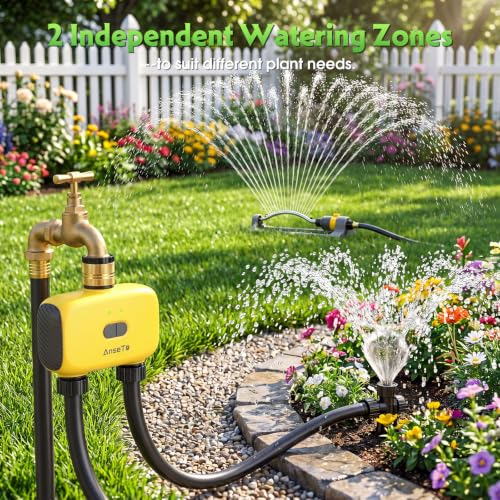
- [User-Friendly Operation]Easily set up the WiFi dual-port water timer and WiFi gateway v…
- [Remote Irrigation Support]Control the dual-port water timer remotely through the APP ev…
- [Voice-Activated Control]This hose timer works with Alexa and Google Assistant. Use simp…
Wrap-Up
Troubleshooting your smart sprinkler system when zones are not running can seem daunting, but by following these steps, you can identify and resolve most issues quickly. Regular maintenance and awareness of your system’s functionalities will enhance its performance and longevity. With the right approach, your smart sprinkler system will keep your lawn and garden thriving.
Recommended Products & Tools
- Intelligent Irrigation Control: The Orbit Smart Sprinkler Controller manages watering wi…
- Indoor/Outdoor Installation: Designed for versatile placement with a protective weatherp…
- Smart Scheduling & Management: Easily create custom irrigation schedules using an app co…

- [User-Friendly Operation]Easily set up the WiFi dual-port water timer and WiFi gateway v…
- [Remote Irrigation Support]Control the dual-port water timer remotely through the APP ev…
- [Voice-Activated Control]This hose timer works with Alexa and Google Assistant. Use simp…
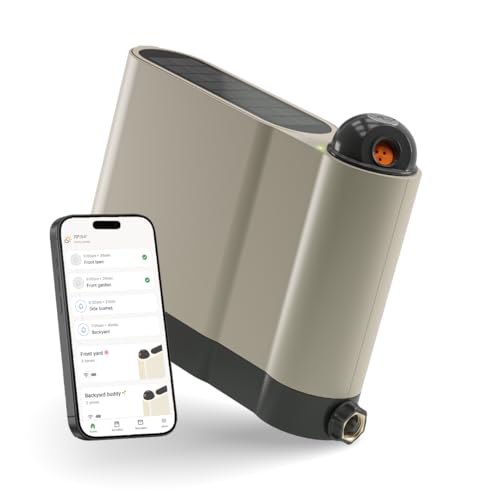
- SMART WATERING, ZERO GUESSWORK – OtO automatically waters your lawn and plants exactly w…
- PRECISION ZONES FOR EVERY YARD – Unlimited customizable spray zones cover lawns, shrubs,…
- SOLAR POWERED FREEDOM – Runs on the sun — no batteries, no wires, no outlet. Just place …

- 4-in-1 Smart Irrigation System & 15-Minute Setup: IrriSense 2 lawn sprinkler combines a …
- Up to 40% Water Conservation:With precise mapping, TÜV-certified EvenRain technology, an…
- Plant-Specific Multi-Zone Irrigation: Customize up to 10 unique irrigation maps for diff…

- Indoor WiFi sprinkler timer puts control of your sprinkler system in the palm of your ha…
- Use mobile device to set, monitor, or adjust schedules anywhere in the world; easily sha…
- Activate any schedule, delay watering, view upcoming watering schedules, manual watering…

- Long Range & Wall‑Penetrating Connectivity: Our WiFi sprinkler controller & RFID gateway…
- Smart App and Voice Control: Take full control of your garden watering with this WiFi wa…
- Sprinkler Timer 3-Zone Custom Watering System: Address different watering needs effortle…
