Where To Place Your Robot Vacuum Dock
Setting up your robot vacuum dock correctly is essential for ensuring optimal performance and convenience. In this guide, you will learn the best practices for dock placement, allowing your vacuum to clean effectively and return to its dock without issues. Additionally, remember to keep the area around the dock clear of obstacles to ensure safe docking and charging.
Disclosure: As an Amazon Associate I earn from qualifying purchases at no cost for you.

- UP TO 75 DAYS HANDS-FREE CLEANING. Dirt and dust stay gone because it empties into the A…
- DEVOURS DIRT WITH 70X MORE POWER-LIFTING SUCTION. 3-Stage Cleaning includes 70X more pow…
- SUPER-SMART MAPPING AND NAVIGATION. ClearView LiDAR quickly maps your home to maximize c…
What You’ll Need
- Your robot vacuum and its charging dock
- Clear space around the docking area
- Measuring tape (optional)
- Non-slip tape (optional, for added stability)
Step-by-Step
- Choose an Accessible Location: Find a spot near an electrical outlet to ensure the dock can be plugged in easily. Ideally, this should be in an area where the vacuum can easily access most parts of your home.
- Avoid Clutter: Ensure the area around the dock is free of furniture, decor, or any other items that could obstruct the robot’s path. A clear space of at least 1-2 feet on either side and 4-5 feet in front of the dock is recommended.
- Consider Floor Type: Place the dock on a flat, stable surface. If your floors are slippery, consider using non-slip tape to prevent movement during docking.
- Keep Away from Stairs: Position the dock away from staircases or ledges. This will help prevent the vacuum from falling and getting damaged while docked or during cleaning.
- Test the Docking Process: Run your vacuum to ensure it can find its way back to the dock without issues. Observe its path and make any necessary adjustments to the dock’s location if it has difficulty docking.
- Use Virtual Barriers: If your vacuum allows, set up virtual barriers to keep it away from areas you don’t want it to clean, which can also help in maintaining a clear path to the dock.
- Regularly Check for Obstacles: Periodically inspect the docking area to ensure it remains free of clutter and obstacles that may have accumulated over time.
- Adjust Based on Performance: If you notice the vacuum isn’t docking correctly or is missing areas, consider relocating the dock slightly to improve accessibility.
Pro Tips for Better Results

- UP TO 75 DAYS HANDS-FREE CLEANING. Dirt and dust stay gone because it empties into the A…
- DEVOURS DIRT WITH 70X MORE POWER-LIFTING SUCTION. 3-Stage Cleaning includes 70X more pow…
- SUPER-SMART MAPPING AND NAVIGATION. ClearView LiDAR quickly maps your home to maximize c…
- Schedule regular cleanings during times when you are away to maintain a tidy home.
- Ensure the dock is in a well-lit area, as this can aid the vacuum’s navigation.
- Utilize the features of your robot vacuum app to customize cleaning schedules and monitor performance.
Common Mistakes
- Placing the dock in tight spaces where the vacuum cannot easily maneuver.
- Ignoring the need for a clear path, which can lead to docking failures.
- Forgetting to regularly clean the dock and the surrounding area, which can hinder performance.
Troubleshooting
- If your vacuum struggles to dock, check for obstructions and ensure the dock’s power supply is functioning.
- If the vacuum doesn’t clean certain areas, reassess the dock placement and adjust for better accessibility.
- If the robot gets stuck frequently, consider using virtual barriers or adjusting the cleaning schedule to avoid high-traffic areas.
Maintenance / Next-Time Checklist
- Regularly check and clean the dock and vacuum to ensure optimal performance.
- Revisit the dock’s placement if your cleaning needs change or if you rearrange your furniture.
- Keep an eye on the vacuum’s sensors and wheels for any debris that could affect its navigation.
Recommended Products & Tools
- Non-Slip Tape: This can help stabilize the dock, preventing it from shifting during use.
- Cleaning Solutions: Keep your robot vacuum clean and in good working condition by using appropriate cleaning solutions for its brushes and sensors.
- Smart Home Devices: Voice assistants can enhance your experience by allowing you to control the vacuum effortlessly.
FAQ
- Can I place the dock in a closet? It’s best to avoid placing the dock in a closet or enclosed space, as the vacuum needs room to navigate back to it.
- What if my vacuum keeps getting stuck? Ensure the path to the dock is free of obstacles and consider adjusting the dock’s location for better accessibility.
- How often should I clean the dock? Regular cleaning of the dock and surrounding area is recommended to maintain optimal performance.
- Is it safe to leave the vacuum dock plugged in? Yes, it is designed to remain plugged in; however, always ensure that the cord is not a tripping hazard.
- Can I use the vacuum on multiple floor types? Yes, many robot vacuums are designed to handle various surfaces, including carpet and hard floors.

- DUAL BRUSHES, DOUBLE DIRT DESTRUCTION. Patented rubber brushes flex and adjust, staying …
- ELIMINATES DIRT & DUST. Powers through pet hair and more with anti-tangle Dual Rubber Br…
- CLEARVIEW PRO LIDAR. Expertly maps your home for maximum coverage and thorough cleaning,…
Wrap-Up
Placing your robot vacuum dock correctly is crucial for maximizing its cleaning efficiency. By following these steps and tips, you can ensure that your vacuum has a clear path to its dock and operates smoothly. Regular maintenance and adjustments based on your cleaning needs will further enhance its performance, leaving your home clean and tidy with minimal effort.
Recommended Products & Tools
- UP TO 75 DAYS HANDS-FREE CLEANING. Dirt and dust stay gone because it empties into the A…
- DEVOURS DIRT WITH 70X MORE POWER-LIFTING SUCTION. 3-Stage Cleaning includes 70X more pow…
- SUPER-SMART MAPPING AND NAVIGATION. ClearView LiDAR quickly maps your home to maximize c…
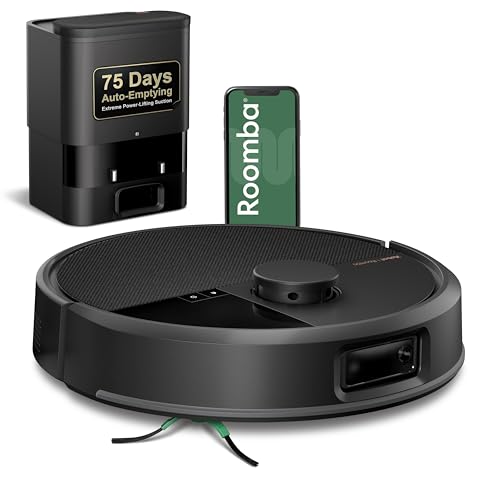
- DUAL BRUSHES, DOUBLE DIRT DESTRUCTION. Patented rubber brushes flex and adjust, staying …
- ELIMINATES DIRT & DUST. Powers through pet hair and more with anti-tangle Dual Rubber Br…
- CLEARVIEW PRO LIDAR. Expertly maps your home for maximum coverage and thorough cleaning,…

- DEVOURS DIRT WITH 70X MORE POWER-LIFTING SUCTION*. 3-Stage Cleaning includes 70X more p…
- SUPER-SMART MAPPING AND NAVIGATION. ClearView LiDAR quickly maps your home to maximize c…
- FULLY CUSTOM AND TARGETED CLEANING. Schedule and target rooms based on your daily routin…

- CHECK VACUUMING OFF YOUR LIST. Effortless to use, the Roomba Vac 2 robot + AutoEmpty doc…
- 3 STAGES OF CLEANING UNITE FOR BAREFOOT-FRIENDLY FLOORS. A powerful 3-Stage Cleaning Sys…
- EMPTIES ITSELF AUTOMATICALLY. With the AutoEmpty dock, the robot self-empties into an en…
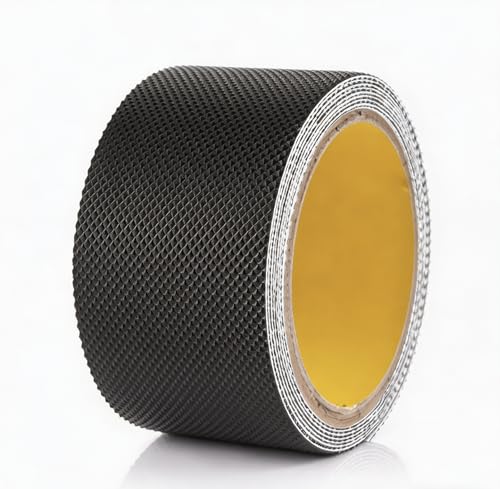
- Universal Compatibility: Designed to fit all robot vacuum dock stations including iRobot…
- Non-Slip Design: Adhesive tape keeps your robot vacuum charging station securely in plac…
- Easy Installation: Simply peel and stick the tape to the bottom of your vacuum dock stat…

- STRONG SUCTION. SERIOUS MOPPING. Devours messes from crumbs to pawprints with 70x more s…
- DOUBLES DOWN ON MOPPING. Spinning DualClean Mop Pads and SmartScrub eradicate messes wit…
- SUPER-SMART MAPPING AND NAVIGATION. ClearView LiDAR quickly maps your home in minutes, a…

