Use Smart Plugs For Holiday Lights
Using smart plugs for holiday lights can transform your festive decorating experience. With the ability to control your lights remotely or through voice commands, you can create a magical atmosphere without the hassle of manual operation. However, it’s essential to follow safety guidelines to ensure your holiday setup is both enjoyable and safe.
Disclosure: As an Amazon Associate I earn from qualifying purchases at no cost for you.

- Warm Tips: To use Alexa and Google Home for voice control, please connect the plug with …
- Simplified Setup: Our upgraded smart plug makes connecting a breeze. Just open the Smart…
- Voice Control: Works with Alexa and Google Assistant, but requires setup through the Sma…
What You’ll Need
- Smart plugs (e.g., EIGHTREE Smart Plug or Kasa Smart Plug)
- Wi-Fi network (2.4GHz compatible)
- Smartphone with the corresponding app (Smart Life, Kasa, etc.)
- Holiday lights compatible with smart plugs
- Access to a voice assistant (Alexa or Google Home, optional)
Step-by-Step
- Choose Your Smart Plug: Select a smart plug that suits your needs. Options like the EIGHTREE Smart Plug or Kasa Smart Plug work well for holiday lights.
- Download the App: Install the appropriate app on your smartphone, such as the Smart Life app or Kasa app.
- Connect the Smart Plug: Plug the smart plug into an outlet and follow the app instructions to connect it to your Wi-Fi network.
- Set Up Your Holiday Lights: Plug your holiday lights into the smart plug. Ensure the lights are in good working condition before proceeding.
- Configure the App: Use the app to name your plug (e.g., “Christmas Lights”) and set schedules or timers for when you want the lights to turn on and off.
- Link to Voice Assistants: If using Alexa or Google Home, follow the app instructions to link your smart plug for voice control.
- Test the Setup: Use the app or voice command to turn the lights on and off, ensuring everything works smoothly.
- Enjoy the Holidays: Sit back and admire your beautifully lit home, knowing you can control your lights effortlessly!
Pro Tips for Better Results

- Warm Tips: To use Alexa and Google Home for voice control, please connect the plug with …
- Simplified Setup: Our upgraded smart plug makes connecting a breeze. Just open the Smart…
- Voice Control: Works with Alexa and Google Assistant, but requires setup through the Sma…
- Use timers to automate your lights, making them turn on at dusk and off at bedtime.
- Group multiple smart plugs in the app for synchronized control of all your holiday lights.
- Consider using outdoor-rated smart plugs if your holiday lights are outside to withstand the elements.
Common Mistakes
- Neglecting to check the compatibility of your holiday lights with the smart plug.
- Forgetting to secure a stable Wi-Fi connection, which may lead to connectivity issues.
- Overloading the smart plug by connecting too many devices, which can be a safety hazard.
Troubleshooting
- If the smart plug is not responding, ensure it is plugged in securely and that your Wi-Fi is functioning.
- Check the app for any firmware updates that may improve performance.
- Reboot the smart plug by unplugging it and plugging it back in if it becomes unresponsive.
Maintenance / Next-Time Checklist
- Test all connections before the holiday season to ensure everything is functioning.
- Clean the smart plug and outlet to prevent dust buildup, which can affect performance.
- Review your schedules and settings after the holidays to prepare for next year.
Recommended Products & Tools
When selecting a smart plug for holiday lights, consider the EIGHTREE Smart Plug, which offers remote control and scheduling features. The Kasa Smart Plug also provides reliable performance and is well-suited for voice control. Both options are compact and won’t block adjacent outlets, making them practical for home use.
FAQ
Can I use smart plugs outdoors for holiday lights?
Yes, but ensure you select outdoor-rated smart plugs designed to withstand weather conditions.
Do I need a hub to use smart plugs?
No, most smart plugs connect directly to your Wi-Fi without needing a separate hub.
Can I control multiple smart plugs at once?
Yes, most apps allow you to group multiple smart plugs for synchronized control.
What if my Wi-Fi goes down?
Smart plugs may not function without a Wi-Fi connection, but they often reconnect automatically once the network is restored.
Are smart plugs safe for use with holiday lights?
Yes, as long as you follow the manufacturer’s guidelines regarding load limits and compatibility.

- Voice control: Kasa smart plugs that work with Alexa and Google Home Assistant. Enjoy th…
- Easy set up and use: 2.4GHz Wi-Fi connection required. Plug in, open the Kase app, follo…
- Scheduling: Use timer or countdown schedules set your smart plug to automatically turn o…
Wrap-Up
Using smart plugs for holiday lights not only enhances convenience but also adds a touch of modern technology to your festive celebrations. By following the steps outlined in this guide and keeping safety in mind, you can create a stunning holiday display that you can control with ease. Enjoy your holidays with the magic of smart lighting!
Recommended Products & Tools
- Warm Tips: To use Alexa and Google Home for voice control, please connect the plug with …
- Simplified Setup: Our upgraded smart plug makes connecting a breeze. Just open the Smart…
- Voice Control: Works with Alexa and Google Assistant, but requires setup through the Sma…

- Voice control: Kasa smart plugs that work with Alexa and Google Home Assistant. Enjoy th…
- Easy set up and use: 2.4GHz Wi-Fi connection required. Plug in, open the Kase app, follo…
- Scheduling: Use timer or countdown schedules set your smart plug to automatically turn o…

- Voice control: Kasa smart plugs that work with Alexa and Google Home Assistant. Enjoy th…
- Easy set up and use: 2.4GHz Wi-Fi connection required. Plug in, open the case app, follo…
- Scheduling: Use timer or countdown schedules set your smart plug to automatically turn o…

- Stability Upgrade Quick Connection:Supports Bluetooth or WiFi connection.The improved Wi…
- Hand-Free Voice Control:Smart plugs that work with Alexa and Googel Assistant. Just give…
- APP Remote Control From Anywhere:You also can control your outlet timers anywhere anytim…
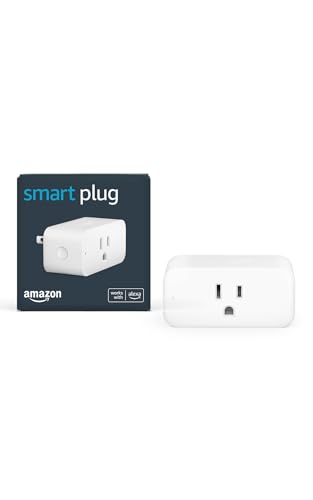
- Amazon Smart Plug works with Alexa to add voice control to any outlet.
- Simple to set up and use—plug in, open the Alexa app, and get started in minutes.
- Compatible with many lamps, fans, coffee makers, and other household devices with a phys…

- 【Warm Tips】 To use Alexa and Google Home for voice control, please connect the plug with…
- 【Simplified Setup】 Our upgraded smart plug makes connecting a breeze. Just open the Smar…
- 【Voice Control】 Works with Alexa and Google Assistant, but requires setup through the Sm…
