How To Add A Garage Door To Alexa Google Or HomeKit
Integrating your garage door with smart home assistants like Alexa, Google Assistant, or HomeKit can enhance convenience and security. By following this guide, you will learn how to add a smart garage door opener to your home network, allowing for remote and voice control. Always ensure safety when working with electrical components.
Disclosure: As an Amazon Associate I earn from qualifying purchases at no cost for you.
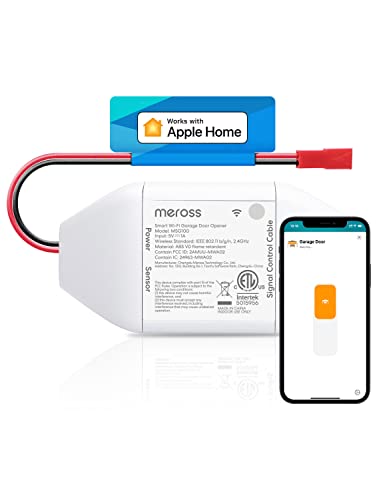
- Be Smart: No need to replace your old garage door opener. The MSG100HK makes your existi…
- Remote Control: You can turn the garage door on/off from anywhere with internet access v…
- Voice Control: You can control your devices hands free, just give voice commands to turn…
What You’ll Need
- A compatible smart garage door opener remote, such as the meross Smart Garage Door Opener Remote or Switchbot WiFi Smart Garage Door Opener.
- A smartphone or tablet for app installation and configuration.
- Access to a stable 2.4GHz Wi-Fi network.
- Basic tools for installation (screwdriver, etc.).
- Safety gear (if necessary, such as gloves and goggles).
Step-by-Step
- Check Compatibility: Before purchasing, confirm that your garage door opener is compatible with the chosen smart controller, especially if it uses Security+ 1.0 or 2.0 protocols.
- Download the App: Install the manufacturer’s app (e.g., Meross app or SwitchBot app) on your smartphone or tablet. Create an account if necessary.
- Install the Smart Opener: Follow the installation instructions provided with your device. Generally, this involves connecting two wires to your garage door opener motor and positioning the controller appropriately.
- Connect to Wi-Fi: Open the app and follow the prompts to connect the smart garage door opener to your 2.4GHz Wi-Fi network. Make sure your Wi-Fi signal is strong near the garage door.
- Integrate with Smart Home Assistants: Within the app, link your smart garage door opener with Alexa, Google Assistant, or HomeKit by following the integration instructions provided in the app.
- Test the System: Use the app and voice commands to open and close the garage door. Check if notifications are functioning correctly.
- Set Up Notifications: Configure your app to send alerts for garage door status changes or if the door has been left open for too long.
- Share Access: If needed, grant access to family members or trusted friends so they can control the garage door remotely.
Pro Tips for Better Results

- Be Smart: No need to replace your old garage door opener. The MSG100HK makes your existi…
- Remote Control: You can turn the garage door on/off from anywhere with internet access v…
- Voice Control: You can control your devices hands free, just give voice commands to turn…
- Place the smart opener controller in a location where it can easily receive Wi-Fi signals.
- Utilize the app’s scheduling feature to automate door operations during specific times.
- Regularly check compatibility and firmware updates for your smart opener to ensure optimal performance.
Common Mistakes
- Neglecting to verify compatibility before purchase, which may lead to installation issues.
- Ignoring Wi-Fi signal strength in the garage, which can cause connectivity problems.
- Forgetting to set up notifications, which can lead to missed alerts about the garage door status.
Troubleshooting
- If the garage door opener does not respond to commands, check the Wi-Fi connection and ensure the device is powered on.
- For app connection issues, try resetting the device and reconnecting to the Wi-Fi network.
- If voice commands do not work, ensure that the smart assistant is correctly linked to the garage door opener in the app.
Maintenance / Next-Time Checklist
- Regularly test the garage door opener to ensure it is functioning correctly.
- Check for firmware updates in the app to improve performance and security.
- Inspect the wiring and connections to ensure they remain secure and free of damage.
Recommended Products & Tools
- meross Smart Garage Door Opener Remote: This device makes your existing garage door opener smart, allowing for remote access and voice control.
- Switchbot WiFi Smart Garage Door Opener: Offers Matter certification for seamless integration with various smart home systems.
- SmartLife App: A user-friendly app that provides remote monitoring and control of your garage door.
FAQ
- Q: Can I control multiple garage doors?
A: Yes, some smart garage door openers, like the meross model, can support multiple doors with additional sensors. - Q: Do I need a hub to use these devices?
A: No, most smart garage door openers listed here do not require a hub for operation. - Q: What should I do if my garage door opener isn’t responding?
A: Check your Wi-Fi connection, ensure the device is powered, and restart the app. - Q: Can I use voice commands with all smart garage door openers?
A: Most models are compatible with voice assistants like Alexa and Google Assistant, but check specifications for your specific model. - Q: Is there a subscription fee for using these smart garage door openers?
A: No, there are no monthly fees associated with using these devices.

- 【𝗥𝗲𝗺𝗼𝘁𝗲 𝗖𝗼𝗻𝘁𝗿𝗼𝗹 & 𝗖𝗵𝗲𝗸 𝘆𝗼𝘂𝗿 𝗚𝗮𝗿𝗮𝗴𝗲】Control your garage door from anywhere with the Switc…
- 【𝗩𝗼𝗶𝗰𝗲 𝗖𝗼𝗻𝘁𝗿𝗼𝗹 & 𝗠𝗮𝘁𝘁𝗲𝗿-𝗖𝗲𝗿𝘁𝗶𝗳𝗶𝗲𝗱】Works with Home Assistant/Alexa/Google Home/IFTTT/Siri…
- 【𝗣𝗟𝗘𝗔𝗦𝗘 𝗧𝗲𝘀𝘁 𝗖𝗼𝗺𝗽𝗮𝘁𝗶𝗯𝗶𝗹𝗶𝘁𝘆 𝗕𝗲𝗳𝗼𝗿𝗲 𝗢𝗿𝗱𝗲𝗿】It is compatible with more than 200 brands. Supp…
Wrap-Up
Adding a garage door opener to your smart home ecosystem is a straightforward process that enhances convenience and security. By following the steps outlined in this guide, you can enjoy the benefits of remote access and voice control. Remember to regularly maintain your system for optimal performance and check for updates to keep everything running smoothly.
Recommended Products & Tools
- Be Smart: No need to replace your old garage door opener. The MSG100HK makes your existi…
- Remote Control: You can turn the garage door on/off from anywhere with internet access v…
- Voice Control: You can control your devices hands free, just give voice commands to turn…

- 【𝗥𝗲𝗺𝗼𝘁𝗲 𝗖𝗼𝗻𝘁𝗿𝗼𝗹 & 𝗖𝗵𝗲𝗸 𝘆𝗼𝘂𝗿 𝗚𝗮𝗿𝗮𝗴𝗲】Control your garage door from anywhere with the Switc…
- 【𝗩𝗼𝗶𝗰𝗲 𝗖𝗼𝗻𝘁𝗿𝗼𝗹 & 𝗠𝗮𝘁𝘁𝗲𝗿-𝗖𝗲𝗿𝘁𝗶𝗳𝗶𝗲𝗱】Works with Home Assistant/Alexa/Google Home/IFTTT/Siri…
- 【𝗣𝗟𝗘𝗔𝗦𝗘 𝗧𝗲𝘀𝘁 𝗖𝗼𝗺𝗽𝗮𝘁𝗶𝗯𝗶𝗹𝗶𝘁𝘆 𝗕𝗲𝗳𝗼𝗿𝗲 𝗢𝗿𝗱𝗲𝗿】It is compatible with more than 200 brands. Supp…

- Compatibility Tips: The smart garage door opener is compatible with 200 brands and over …
- More Smart Remote: The external antenna can better receive wifi signals and can support …
- Remote and Voice Control: You can control your devices hands free, just give voice comma…
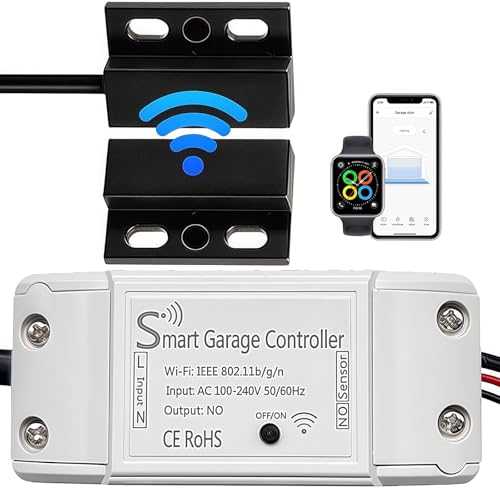
- 1.Smart Home Lifestyle:Add the smart garage door opener controller to your garage door o…
- 2.COMPATIBILITY CHECK:If you are not sure if the smart garage door opener is compatible,…
- 3.Remote control: Installing the wifi smart garage controller allows you to remotely det…

- Remote Control: Open, close, check door status, receive just within your Refoss iOS/andr…
- Voice Control: You can control your devices hands free, just give voice commands to turn…
- Compatibility Check: It is compatible with more than 200 brands. Please check whether yo…

- 𝐂𝐨𝐦𝐩𝐚𝐭𝐢𝐛𝐢𝐥𝐢𝐭𝐲 – 𝐖𝐨𝐫𝐤𝐬 𝐰𝐢𝐭𝐡 𝐆𝐞𝐧𝐢𝐞 & 𝐎𝐯𝐞𝐫𝐡𝐞𝐚𝐝 𝐃𝐨𝐨𝐫 𝐎𝐩𝐞𝐧𝐞𝐫𝐬 (𝟏𝟗𝟗𝟓+ 𝐌𝐨𝐝𝐞𝐥𝐬, 𝐍𝐨 𝐃𝐢𝐩 𝐒𝐰𝐢𝐭𝐜𝐡)–…
- 𝐕𝐨𝐢𝐜𝐞 𝐂𝐨𝐧𝐭𝐫𝐨𝐥 – 𝐖𝐨𝐫𝐤𝐬 𝐰𝐢𝐭𝐡 𝐀𝐥𝐞𝐱𝐚, 𝐆𝐨𝐨𝐠𝐥𝐞 𝐇𝐨𝐦𝐞 & 𝐒𝐢𝐫𝐢—njoy hands-free operation Works w…
- 𝐈𝐧𝐬𝐭𝐚𝐧𝐭 𝐍𝐨𝐭𝐢𝐟𝐢𝐜𝐚𝐭𝐢𝐨𝐧𝐬 & 𝐂𝐮𝐬𝐭𝐨𝐦 𝐑𝐞𝐦𝐢𝐧𝐝𝐞𝐫𝐬—Receive push notifications for every door mov…

