How To Test Smart Alarm Alerts And Notifications
In this guide, you will learn how to effectively test smart alarm alerts and notifications, ensuring that your home remains secure and you remain informed during emergencies. Testing these systems is crucial for verifying their functionality and reliability. Always remember to follow safety protocols when working with any electrical devices.
Disclosure: As an Amazon Associate I earn from qualifying purchases at no cost for you.

- Beware: Please download the correct APP based on the product page reference video and th…
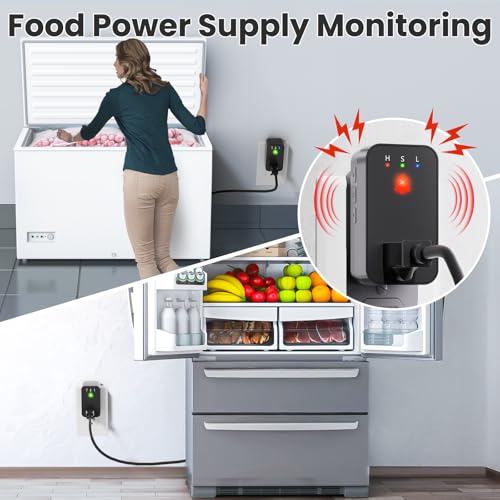
- SMART WIFI POWER OUTAGE ALARM: Smart power outage monitor for a household fridge, deep f…
- "Smart Life" / "Tuya" APP NOTIFICATIONS: Support 2.4GHz Wi-Fi signal and connect with "S…
What You’ll Need
- Smart alarm device (e.g., power failure alarm, water leak detector)
- Smartphone with the relevant app installed
- Access to your home Wi-Fi network (2.4GHz recommended)
- Test environment (e.g., appliance you want to monitor)
- Timer or stopwatch (optional)
Step-by-Step
- Install the App: Download the appropriate app for your smart alarm device (e.g., “Smart Life” or “Tuya”). Make sure to follow the installation instructions carefully.
- Connect the Device: Follow the app’s instructions to connect your smart alarm to your home Wi-Fi network. Ensure it is powered on and ready for setup.
- Configure Notifications: Set up app notifications in the app settings. Ensure that you enable push notifications so you can receive alerts on your smartphone.
- Simulate an Alert: For a power failure alarm, unplug the device it monitors (e.g., a freezer); for a water leak detector, place a small amount of water near the sensor. This will trigger the alert.
- Check Notifications: Monitor your smartphone for alerts. Verify that you receive a notification promptly after simulating the alert.
- Test Volume Settings: If applicable, adjust the volume settings of the alarm to ensure it is audible. Test the device at different volume levels to find the most suitable one.
- Review Alert History: Access the app to check the alert history. Confirm that the simulated alerts are logged correctly.
- Conduct a Full System Test: Repeat the above steps with different scenarios (e.g., power outage, water leak) to ensure all functionalities work as expected.
Pro Tips for Better Results
- Beware: Please download the correct APP based on the product page reference video and th…
- SMART WIFI POWER OUTAGE ALARM: Smart power outage monitor for a household fridge, deep f…
- "Smart Life" / "Tuya" APP NOTIFICATIONS: Support 2.4GHz Wi-Fi signal and connect with "S…
- Test the device during different times of the day to see if notifications are received consistently.
- Ensure your smartphone has a stable internet connection to avoid missing alerts.
- Consider testing the device in various locations to confirm its range and reliability.
Common Mistakes
- Forgetting to enable notifications in the app settings, leading to missed alerts.
- Using a 5GHz Wi-Fi connection instead of the required 2.4GHz, which may cause connectivity issues.
- Neglecting to check the alarm volume settings, resulting in alerts being inaudible.
Troubleshooting
- If you do not receive notifications, check your Wi-Fi connection and ensure the device is within range.
- Restart your smartphone and the smart alarm device to refresh the connection.
- Ensure that the app is updated to the latest version to avoid compatibility issues.
Maintenance / Next-Time Checklist
- Regularly test the device every few months to ensure functionality.
- Check for software updates in the app to improve performance and security.
- Inspect the device for any physical damage that may affect its operation.
Recommended Products & Tools
When testing smart alarm alerts, consider using:
- Power Failure Alarm: This device alerts you during power outages, ensuring you don’t miss critical notifications for appliances like freezers or sump pumps.
- Water Leak Detector: Ideal for monitoring moisture in basements or kitchens, it provides timely alerts to prevent water damage.
- Smart Door Alarms: Useful for monitoring entrances, ensuring you are notified if someone opens a door, particularly for vulnerable individuals.
FAQ
1. How often should I test my smart alarm?
It’s recommended to test your smart alarm every 2-3 months to ensure it functions properly.
2. What if I don’t receive notifications?
Check your app settings, ensure Wi-Fi connectivity, and confirm that notifications are enabled on your smartphone.
3. Can I connect multiple devices to the same app?
Yes, most smart alarm apps allow you to connect and manage multiple devices from a single account.
4. What should I do if the alarm goes off unexpectedly?
Investigate the source of the alarm, ensuring it’s not a false alert. If necessary, consult the user manual for troubleshooting.
5. Are there any subscription fees for notifications?
Some smart alarms offer free app notifications, while premium features like SMS or email alerts may require a subscription.

- The original power outage alert system: This device, built by Bell Labs engineers to pro…
- Security away from home: You will never again have to ask, "Is my power out?" or "Is the…
- Immediate detection: You will be alerted of a power failure in your home or business wit…
Wrap-Up
Testing your smart alarm alerts and notifications is essential for maintaining a secure home environment. By following the steps outlined in this guide, you can ensure that your smart devices are functioning correctly and providing you with timely alerts. Regular maintenance and testing will help keep your home safe and give you peace of mind.
Recommended Products & Tools
- Beware: Please download the correct APP based on the product page reference video and th…
- SMART WIFI POWER OUTAGE ALARM: Smart power outage monitor for a household fridge, deep f…
- "Smart Life" / "Tuya" APP NOTIFICATIONS: Support 2.4GHz Wi-Fi signal and connect with "S…

- The original power outage alert system: This device, built by Bell Labs engineers to pro…
- Security away from home: You will never again have to ask, "Is my power out?" or "Is the…
- Immediate detection: You will be alerted of a power failure in your home or business wit…

- Remotely Monitoring Leaking – Connect the hub to WiFi, then monitor the water leakage in…
- Pre-paired Sensors & Easy Set Up – When the hub successfully connects to WiFi for the fi…
- APP & SMS & Email Notification – Receive the instant app notifications and alerts when a…

- WiFi Door Alarms Works Function:This WiFi alarm device can be connected to cell phone wi…
- Keep your home/office safety:You could hear doorbell chime from Gateway(Receiver)and war…
- Multiple melodies;Loud chime&Provide peace of mind for the hearing impaired: The Plug in…

- 【Reliable Power Failure Alarm for Indoor & Outdoor Use】Keep your home and outdoor equip…
- 【Outdoor Applications】Designed to withstand weather, this device is ideal for monitoring…
- 【Indoor Applications】Perfect for critical indoor appliances: refrigerators, aquariums, …

- Note: Compatible only with 2.4 GHz Wi-Fi (incompatible with 5.0 GHz); connects to the X-…
- Never Miss a Leak: When a water leak is detected, a red light will flash on the water le…
- Feature-Rich App: Adjust the base station alarm volume, mute an alarm, and view your ala…

